[drupal-devel] AJAX approach to free tagging (Multiple text Applicator)

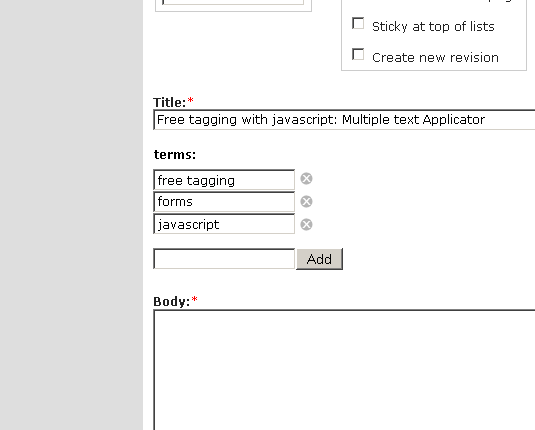
Have you seen the Multiple Text Applicator at http://sparkcasting.com/assets/ajax/mta/ ? This could come really handy for free tagging. What it does is that it tranforms a comma seperated list in a text filed to an UI for managing lists. I've attached a simple mockup for how it could look in Drupal for a free tagging text field. The only drawback I've seen so far is that it adds an extra textfield when stylesheets is turn off in the browser. __________________________________________________ Do You Yahoo!? Tired of spam? Yahoo! Mail has the best spam protection around http://mail.yahoo.com

On 07/06/05, a f <fajerstarter@yahoo.com> wrote:
Have you seen the Multiple Text Applicator at http://sparkcasting.com/assets/ajax/mta/ ?
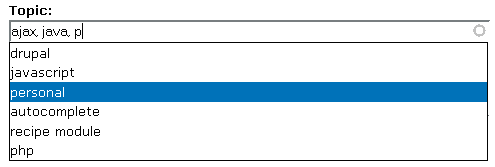
After taking a quick look, it makes me curious if it is any faster than the existing folksonomy input that is already available (in CVS at least) using autocomplete - I doubt it. See attached image. However, I can see the add/delete interface being helpful in other areas. For example, adding new recipe ingredients (recipe.module) would be easier using the kind of interface you've mentioned. -- David Carrington
--- David Carrington <david.carrington@gmail.com> wrote:
After taking a quick look, it makes me curious if it is any faster than the existing folksonomy input that is already available (in CVS at least) using autocomplete - I doubt it. See attached image.
I can agree that this isn't much faster, even though it works really well with just the keyboard. But on the otherhand, I don't think that is the main purpose with this kind of change to the UI; it's intended to make it more intuitive to add several terms. Plus, wouldn't it be poosible to add autocomplete to the fields? __________________________________ Discover Yahoo! Have fun online with music videos, cool games, IM and more. Check it out! http://discover.yahoo.com/online.html
On 07/06/05, a f <fajerstarter@yahoo.com> wrote:
I can agree that this isn't much faster, even though it works really well with just the keyboard. But on the otherhand, I don't think that is the main purpose with this kind of change to the UI; it's intended to make it more intuitive to add several terms.
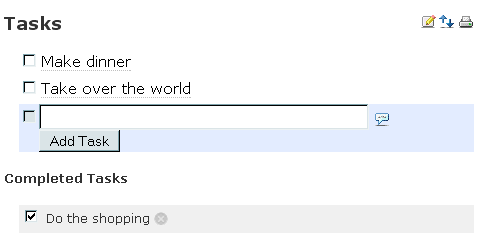
I think a comma-separated list is clear enough for simple things like keywords. An interface like MTA is suitable for slightly more complex systems such as task lists (see attached screenshot of "taskThis"). For instance, I'm pretty sure that most e-mail software has a delimited list of addresses to send to, as opposed to a number of text fields. -- David Carrington
participants (2)
-
 a f
a f -
 David Carrington