[drupal-devel] settings inconsistencies

Hi, I have just seen while reviewing my Drupal HEAD update diff, that the profile admin pages have been moved from the user admin area to the general module admin area. What is the rationale behind this? Content settings are under the content menu item, comments similarly. Why are profiles moved to the general module admin? Goba

Gabor Hojtsy wrote:
Hi,
I have just seen while reviewing my Drupal HEAD update diff, that the profile admin pages have been moved from the user admin area to the general module admin area. What is the rationale behind this? Content settings are under the content menu item, comments similarly. Why are profiles moved to the general module admin?
Goba
They were moved to give them greater attention. Admins were missing that feature entirely. They did not think of profile setup as Users => Configure. I think this is a matter of taste, and possibly not worth debating.
I have just seen while reviewing my Drupal HEAD update diff, that the profile admin pages have been moved from the user admin area to the general module admin area. What is the rationale behind this? Content settings are under the content menu item, comments similarly. Why are profiles moved to the general module admin?
They were moved to give them greater attention. Admins were missing that feature entirely. They did not think of profile setup as Users => Configure.
I think this is a matter of taste, and possibly not worth debating.
It is a matter of consistency I think. Now we have object focused admin interfaces (eg. content, where you can set content options, review content, etc). Similarly for comments. And then we have task oriented admin interfaces, which means basically anything under admin >> settings. Chx also pointed this out before, and it seemed that Drupal is going to the object based direction to utilize tabs (local tasks related to objects) instead of cluttering the menu. Now this change goes in the other direction. Goba

Op dinsdag 1 februari 2005 20:39, schreef Gabor Hojtsy:
It is a matter of consistency I think. Now we have object focused admin interfaces (eg. content, where you can set content options, review content, etc). Similarly for comments. And then we have task oriented admin interfaces, which means basically anything under admin >> settings. Chx also pointed this out before, and it seemed that Drupal is going to the object based direction to utilize tabs (local tasks related to objects) instead of cluttering the menu. Now this change goes in the other direction.
...which will greatly improve consistancy and useability. Object based admin is very unusable, and gets very inconvenient I.C.W. role-bassed admin, and a modular system. consistent.druypaldevs.org (refer to earlier posted msgs) is a test a for a full task and menu-based approach. So far I managed to make Drupal there much more consistent, but above all much better useable, since all settings are always only three clicks away. Regards, Bèr -- [ Bèr Kessels | Drupal services www.webschuur.com ]

Gabor Hojtsy wrote:
They were moved to give them greater attention. Admins were missing that feature entirely. They did not think of profile setup as Users => Configure.
I think this is a matter of taste, and possibly not worth debating.
It is a matter of consistency I think. Now we have object focused admin interfaces (eg. content, where you can set content options, review content, etc). Similarly for comments. And then we have task oriented admin interfaces, which means basically anything under admin >> settings. Chx also pointed this out before, and it seemed that Drupal is going to the object based direction to utilize tabs (local tasks related to objects) instead of cluttering the menu. Now this change goes in the other direction.
The inconsistency of the administration interface (and most notably the location/organization of the settings) is a major issue. It is worth debating and worth improving for Drupal 4.6. After all, usability improvements are still being accepted. For example, why are the profile settings under 'admin > settings' but the input filters directly under 'admin'? Can anyone answer that question? On a related note, this month I observed two colleagues installing and configuring their own Drupal 4.5.2 site independently from each other. Both had problems locating settings and both reported that they found it confusing that enabling a module "adds new settings at what seems to be random pages". Furthermore, at one point they both enabled the search module and they both reported (again, independently from each other) that "their visitors could not search the site while they could". Turned out that neither checked the permission page after enabling the search module. Even after a few hours fiddling with Drupal, they did not expect an 'access search' permission to become available. -- Dries Buytaert :: http://www.buytaert.net/
Dries Buytaert wrote:
For example, why are the profile settings under 'admin > settings' but the input filters directly under 'admin'? Can anyone answer that question?
On a related note, this month I observed two colleagues installing and configuring their own Drupal 4.5.2 site independently from each other. Both had problems locating settings and both reported that they found it confusing that enabling a module "adds new settings at what seems to be random pages".
Furthermore, at one point they both enabled the search module and they both reported (again, independently from each other) that "their visitors could not search the site while they could". Turned out that neither checked the permission page after enabling the search module. Even after a few hours fiddling with Drupal, they did not expect an 'access search' permission to become available.
Also, one collleague wanted to hide the author information on nodes. He didn't find the setting until I told him where to look for it. The fact that this setting is theme-specific is a lot less intuitive than we like to believe (especially because 95% of the sites use only one theme). -- Dries Buytaert :: http://www.buytaert.net/

Dries Buytaert wrote:
Gabor Hojtsy wrote:
They were moved to give them greater attention. Admins were missing that feature entirely. They did not think of profile setup as Users => Configure.
I think this is a matter of taste, and possibly not worth debating.
It is a matter of consistency I think. Now we have object focused admin interfaces (eg. content, where you can set content options, review content, etc). Similarly for comments. And then we have task oriented admin interfaces, which means basically anything under admin
settings. Chx also pointed this out before, and it seemed that Drupal is going to the object based direction to utilize tabs (local tasks related to objects) instead of cluttering the menu. Now this change goes in the other direction.
The inconsistency of the administration interface (and most notably the location/organization of the settings) is a major issue. It is worth debating and worth improving for Drupal 4.6. After all, usability improvements are still being accepted.
For example, why are the profile settings under 'admin > settings' but the input filters directly under 'admin'? Can anyone answer that question?
On a related note, this month I observed two colleagues installing and configuring their own Drupal 4.5.2 site independently from each other. Both had problems locating settings and both reported that they found it confusing that enabling a module "adds new settings at what seems to be random pages".
Furthermore, at one point they both enabled the search module and they both reported (again, independently from each other) that "their visitors could not search the site while they could". Turned out that neither checked the permission page after enabling the search module. Even after a few hours fiddling with Drupal, they did not expect an 'access search' permission to become available.
I'd like to point out that this particular issue has been addressed partially by the "access control" patch. I think we need to look at other ideas for the admin interface, but in the mean time, moving things around a bit can be a great improvement in the mean time. 4.6 is going to be around us for a while, it would make sense to tune the admin interface in its current incarnation too. Steven Wittens
It is a matter of consistency I think. Now we have object focused admin interfaces (eg. content, where you can set content options, review content, etc). Similarly for comments. And then we have task oriented admin interfaces, which means basically anything under admin
settings. Chx also pointed this out before, and it seemed that Drupal is going to the object based direction to utilize tabs (local tasks related to objects) instead of cluttering the menu. Now this change goes in the other direction.
A bit late, but here's the rationale. People didn't look for profiles under users -> configure as it was buried to deep. It is hard to notice that something has popped up that deep when you've just enabled the module. Making it a higher level item is handier to use. Also, IMO setting up profiles does not have a direct relation to the user objects. It's the filling in/editing of a single user's profile itself that I would classify under "users" rather than setting up the fields. I think many admins will think the same. Steven Wittens

Okay, I'm a little late to this debate, but I just updated my demo site with all of the latest drupal updates (BTW the many changes from the last few days alone are going to make 4.6 an awesome release - hats off to everyone - but that is a different topic - ). 1) Why in the world is there still a 'settings' menu item with sub-items for modules? A great number of module's settings are directly under administer - what makes them so special? - or rather what makes those modules listed under administer->settings less worthy of a top level position? Why not rename 'settings' to 'Drupal settings' and move everything currently under 'settings' to be directly under administer? 2) Regarding 'user' settings. Taking access control out of the local task (tabs) of users is a good idea. Likewise taking profile settings out of the local task is a good thing. But all three things are still related to users - and now they are in three different places (logically and visually). Call me crazy - but why not have: Administer -> Users -> User access control -> User profile settings If the answer is "That is too many clicks" - Then just rename the titles so they show up one after the other in the Administer menu. Yes talk is cheap - so I'll stop typing and start looking at the code to at very least get the user settings closer to each other. andre
Andre Molnar wrote:
Yes talk is cheap - so I'll stop typing and start looking at the code to at very least get the user settings closer to each other.
I wasn't sure before I looked at the code, but indeed - the is no reason as far as difficulty in coding to make these changes - the menu hook for these items takes care of positioning as expected. Depending on feedback, I will submit patches. andre
Andre Molnar wrote:
I wasn't sure before I looked at the code, but indeed - the is no reason as far as difficulty in coding to make these changes - the menu hook for these items takes care of positioning as expected.
Depending on feedback, I will submit patches.
That makes the menu too long/flat, IMO. One alternative would be to have 'access control' and 'profile' tabs directly under 'admin - user', instead of under 'admin - user - configure' (one level less deep). What is most needed is a highly-predictable location for settings (without making them hard to access). The problem is that some settings, like the throttle module settings can only live under 'admin - settings'. As a result, the 'object oriented model' doesn't really fly. -- Dries Buytaert :: http://www.buytaert.net/

On Wed, 02 Feb 2005 09:27:58 +0100, Dries Buytaert <dries@buytaert.net> wrote:
Andre Molnar wrote:
I wasn't sure before I looked at the code, but indeed - the is no reason as far as difficulty in coding to make these changes - the menu hook for these items takes care of positioning as expected. Depending on feedback, I will submit patches.
That makes the menu too long/flat, IMO.
One alternative would be to have 'access control' and 'profile' tabs directly under 'admin - user', instead of under 'admin - user - configure' (one level less deep).
This is what I'd prefer. Similar problems happen with the comment module. -- Tim Altman
Please look at consistent.drupaldevs.org. Most of you ideas are implemented there already, be in a slightly different way. 1) documentation is on http://dev.bryght.com/t/wiki/DrupalRestructure 2) working example is at http://consistent.drupaldevs.org/ Please log in there with your drupal ID, and give me a shout (IM or mail) ***NOTE!! the settings and changes wont make any sense for anonymous **nor** for registered users. Only adminsitrators see how it should look!** So again: Do not start yelling: "it looks like crap" when you do not have admin rights there!! Bèr Op woensdag 2 februari 2005 09:32, schreef Tim Altman:
On Wed, 02 Feb 2005 09:27:58 +0100, Dries Buytaert <dries@buytaert.net>
wrote:
Andre Molnar wrote:
I wasn't sure before I looked at the code, but indeed - the is no reason as far as difficulty in coding to make these changes - the menu hook for these items takes care of positioning as expected. Depending on feedback, I will submit patches.
That makes the menu too long/flat, IMO.
One alternative would be to have 'access control' and 'profile' tabs directly under 'admin - user', instead of under 'admin - user - configure' (one level less deep).
This is what I'd prefer. Similar problems happen with the comment module. Regards, Bèr -- [ Bèr Kessels | Drupal services www.webschuur.com ]

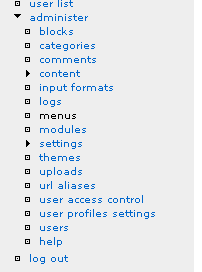
Dries Buytaert wrote:
That makes the menu too long/flat, IMO.
One alternative would be to have 'access control' and 'profile' tabs directly under 'admin - user', instead of under 'admin - user - configure' (one level less deep).
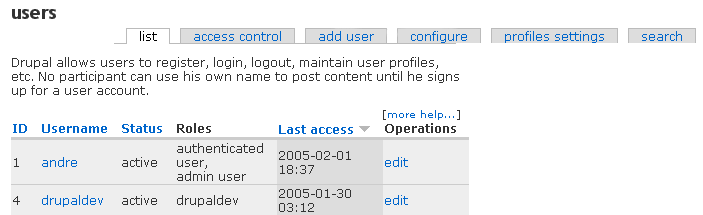
Patch to follow if the attached screen capture is what you would like. andre
That makes the menu too long/flat, IMO.
One alternative would be to have 'access control' and 'profile' tabs directly under 'admin - user', instead of under 'admin - user - configure' (one level less deep).
Patch to follow if the attached screen capture is what you would like.
This type of tabs absolutely break the "use a verb to signify a local task" rule, which was introduced before (although might fix some problems, will open another can of worms). Goba
Gabor Hojtsy wrote:
That makes the menu too long/flat, IMO.
One alternative would be to have 'access control' and 'profile' tabs directly under 'admin - user', instead of under 'admin - user - configure' (one level less deep).
Patch to follow if the attached screen capture is what you would like.
This type of tabs absolutely break the "use a verb to signify a local task" rule, which was introduced before (although might fix some problems, will open another can of worms).
The access control patch already breaks this. The rationale is that the 3 tabs /are/ still local tasks to do with access control, but 'verbing' them would not make them clearer. I suppose the proper local tasks would be "set up permission" "set up roles" and "set up account rules", but that doesn't make the screen much clearer really. However, a big -1 from me on moving them under admin>users. I don't think people will see "access control" and "profile setup" as something to with "adminstering users". For me, "users" are the people. Setting up profile fields is not "administer users", it is editing the people's profile information which is. Setting up rules is not "administer users", choosing which people go in what role is. Steven Wittens
However, a big -1 from me on moving them under admin>users. I don't think people will see "access control" and "profile setup" as something to with "adminstering users". For me, "users" are the people. Setting up profile fields is not "administer users", it is editing the people's profile information which is. Setting up rules is not "administer users", choosing which people go in what role is.
Ok, then. Setting up workflows (now under content settings) is "content"? Goba

This is true. There should be only three tabs showing primary (list,Groups,users)with a secondaries for each. Right now the grops and users primary and secondary are mixed up and confusing. Steven Wittens wrote:
Gabor Hojtsy wrote:
That makes the menu too long/flat, IMO.
One alternative would be to have 'access control' and 'profile' tabs directly under 'admin - user', instead of under 'admin - user - configure' (one level less deep).
Patch to follow if the attached screen capture is what you would like.
This type of tabs absolutely break the "use a verb to signify a local task" rule, which was introduced before (although might fix some problems, will open another can of worms).
The access control patch already breaks this. The rationale is that the 3 tabs /are/ still local tasks to do with access control, but 'verbing' them would not make them clearer. I suppose the proper local tasks would be "set up permission" "set up roles" and "set up account rules", but that doesn't make the screen much clearer really.
However, a big -1 from me on moving them under admin>users. I don't think people will see "access control" and "profile setup" as something to with "adminstering users". For me, "users" are the people. Setting up profile fields is not "administer users", it is editing the people's profile information which is. Setting up rules is not "administer users", choosing which people go in what role is.
Steven Wittens
-- Carl McDade Information Technology Consult www.carlmcdade.com carlmcdade@gmail.com Customer Relationship and E-commerce Technology Services for small businesses ____________________________________________________________________________ kläppavägen 9a 82735 Ljusdal Sweden tel.0651-15805 telefax 0651-10875 Organisationsnummer: 590310-2050 VAT-nr. SE590310205001 Innehar F-Skattebevis bankgiro: 5115 4433
Steven Wittens wrote:
However, a big -1 from me on moving them under admin>users. I don't think people will see "access control" and "profile setup" as something to with "adminstering users". For me, "users" are the people. Setting up profile fields is not "administer users", it is editing the people's profile information which is. Setting up rules is not "administer users", choosing which people go in what role is.
I agree for the most part, but I always hesitate when I see the words "I don't think people will..." since we all know that all people are different. I *personally* would look for access control with users (or at least near users: as in, admin>user access control), but that's just me... and at the end of the day, I don't care where I find it as long as the functionality exists :) How about the following local tasks is users: Users (default - currently called list) -Add User (local task to users>users) Roles -Add Role (local task to users>roles) Configure 3 tabs that are very specific to users and nothing else. (I know that list is a standard Drupal thing, but it is completely non descriptive, and in this case 'list' wouldn't differentiate between listing users and listing roles) As for access control: leave it outside of users, and have its local tasks be: Permissions (default) Rules Nothing else (until such time that new access control features exist) andre (happy to do the patch if peole like this idea)
Andre Molnar wrote:
I agree for the most part, but I always hesitate when I see the words "I don't think people will..." since we all know that all people are different. I *personally* would look for access control with users (or at least near users: as in, admin>user access control), but that's just me... and at the end of the day, I don't care where I find it as long as the functionality exists :)
I too would look for roles under 'admin - user'. Adminittetly, I wouldn't look for it under 'admin - user - configure'. I would find it under 'access control' though, but it wouldn't be my first guess. What bother me too is that 'admin - user - configure' still has: 1. access-related settings 2. profile-related settings
How about the following local tasks is users:
Users (default - currently called list) -Add User (local task to users>users) Roles -Add Role (local task to users>roles) Configure
3 tabs that are very specific to users and nothing else. (I know that list is a standard Drupal thing, but it is completely non descriptive, and in this case 'list' wouldn't differentiate between listing users and listing roles)
As for access control: leave it outside of users, and have its local tasks be:
Permissions (default) Rules
I like the idea but it's hard to evaluate without being able to see it in action. -- Dries Buytaert :: http://www.buytaert.net/
Please don't use the word "roles" on a tab. The semantics of UI functions are very important and use of the word "role" or "roles" is not in keeping with the actual function. "roles" or "roles" is the word used when speaking of an individual not a group. The function is one that is that of setting and configuring "groups" or multiple users in a category. The semantics of the three words user, role and group must be used in thier proper grammatical sense or you will cause confusion in not only the english statements but any subsequent translations. user - refers to the individual role - is a reference word only to be used in place of the word "group" when "group" does not satisfy the grammer used within the sentence or referring statement. This is NOT a global usage word. group - is the global reference word. examples to satisfy the difference. you cannot say "What roles does the user have and how to set thier permissions" without giving the implying singularity. I says that you are talking of a single instance of user when in fact thier may be many. Proper usage would be " What groups does the user belong to and how to set their permissions" This is important as I have been looking over the documentation and have found many case where the documentation is wrong or confusing because of the semantics used in the UI functions. This also can effect the way security is impleted and talked about. "permissions by role" and "group permissions" is entirely correct. But "role permissions" is wrong in most cases and "permissions by group" is just never used at all. Carl McDade Andre Molnar wrote:
Dries Buytaert wrote:
I like the idea but it's hard to evaluate without being able to see it in action.
I'll implement it on my demo site and post when its ready - I'll roll a patch if it looks good to you.
andre
Andre Molnar wrote:
Dries Buytaert wrote:
I like the idea but it's hard to evaluate without being able to see it in action.
I'll implement it on my demo site and post when its ready - I'll roll a patch if it looks good to you.
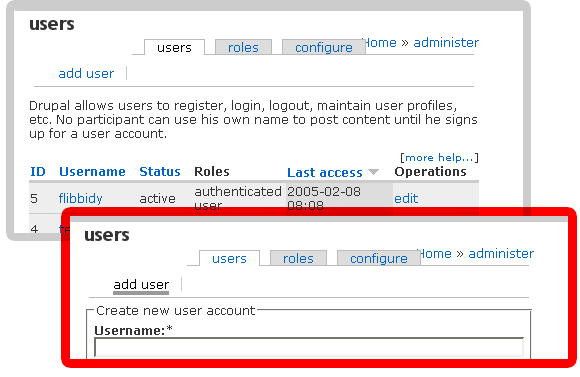
Dries, Attached is a screen shot of what I have done on my demo site with the user module menus. Notes: 1) I know 'list' seems to be the standard default local task name, but I hope everyone can see that the 3 tabs named 'users' 'roles' and 'configure' are much more clear. 2) I know that 'add user' doesn't look all that sharp, but everyone should keep in mind that local tasks and secondary local tasks are themable (i.e. if you don't like the way it looks you can do something about it). If people think that this makes sense, I will roll a full patch. I am actually in the middle of cleaning up a number of items in 'user.module' that I came across while working out the menus. (e.g. I've fixed broken help text links and I am noticing a few coding inconsistencies in this module that I hope to improve). Also look for a patch to menu.inc - I found a tiny bug in the way local task menus are created. andre
Hi all, I have been following this thread with interest, but I am afraid is is not leading toa real solution, but rather to another "per casse solution", that makes drupal more and more inconsistant. http://consistent.drupaldevs.org/node Here is my proposed solution, that I built up from a philosofy, after looking at various other CMS and even desktop configuration systems. It should be a well balanced solution that takes into conssideration: Roles, tasks and most importantly frequency of visits to pages. after all: one needs to change the cache settings only very few times, while path moderation will happen more frequent. PLease, I have asked it very often: give some feedback on this, I would like to proceed. So far I have only received very few (but very good) feedback. One is to rename the "Moderate" menu into something more meaningfull. Also note, that I now changed the permissions: Everyone who is registered there will see the menus/structure as it should be. Anonymous users will not. Bèr Op dinsdag 8 februari 2005 10:10, schreef Andre Molnar:
Andre Molnar wrote:
Dries Buytaert wrote:
I like the idea but it's hard to evaluate without being able to see it in action.
I'll implement it on my demo site and post when its ready - I'll roll a patch if it looks good to you.
Dries,
Attached is a screen shot of what I have done on my demo site with the user module menus.
Notes: 1) I know 'list' seems to be the standard default local task name, but I hope everyone can see that the 3 tabs named 'users' 'roles' and 'configure' are much more clear. 2) I know that 'add user' doesn't look all that sharp, but everyone should keep in mind that local tasks and secondary local tasks are themable (i.e. if you don't like the way it looks you can do something about it).
If people think that this makes sense, I will roll a full patch. I am actually in the middle of cleaning up a number of items in 'user.module' that I came across while working out the menus. (e.g. I've fixed broken help text links and I am noticing a few coding inconsistencies in this module that I hope to improve).
Also look for a patch to menu.inc - I found a tiny bug in the way local task menus are created.
andre Regards, Bèr -- [ Bèr Kessels | Drupal services www.webschuur.com ]

It should be a well balanced solution that takes into conssideration: Roles, tasks and most importantly frequency of visits to pages. after all: one needs to change the cache settings only very few times, while path moderation will happen more frequent. I agree.
PLease, I have asked it very often: give some feedback on this, I would like to proceed. So far I have only received very few (but very good) feedback. One is to rename the "Moderate" menu into something more meaningfull.
I hope mine will get into the meaningful feadback category. First what I like: * mainly the logical structure. I like that. * the separation between content navigation, content management and site administration works for me. They clearly separate the concerns, when working with a website. Comments/not sure about: * I would personally upgrade the permissions and access rules sub-menus to their own administration section -security or something similar. Why? **From a sysadmin's point of view security is a major concern. These settings may not be changed frequently, but are reviewed on a regular basis. **There may be add-on modules providing different realms, requiring some, yet unknown, configuration mechanism, a security menu will give them a good place to live. * I concur with the Moderate-> to something better "Content Management"? * I'm not sure about the logs being in the Navigation menu **Logs and statistics generally are of major interest to website husbandry. Log analysis and the related activities are not akin to navigating content, searching for content, website help. They are different. I would suggest relocating them to Administer, or them living in their own block. This would be dependent on what statistics Drupal will provide by default. Cheers, Vlado -- Vladimir Zlatanov <vlado@dikini.net>
Hi, Thanks for the feedback.
First what I like: * mainly the logical structure. I like that. * the separation between content navigation, content management and site administration works for me. They clearly separate the concerns, when working with a website.
Good to hear.
Comments/not sure about: * I would personally upgrade the permissions and access rules sub-menus to their own administration section -security or something similar. Why? **From a sysadmin's point of view security is a major concern. These settings may not be changed frequently, but are reviewed on a regular basis. **There may be add-on modules providing different realms, requiring some, yet unknown, configuration mechanism, a security menu will give them a good place to live.
I had that in my original plan. But decided to move it to the adminster section. Why? * Sysadmins are in most cases the user admins too. thoise few large sistes that have different roles for site- and user admin can move the menus themselves. But lets say this is open for discussion still, Anyone any ideas on this?
* I concur with the Moderate-> to something better "Content Management"? All the other blocks and items are verbs. The reason is that you can read the task aloud: Administer > layout = "adminster layout" Moderate > content = moderate content. etc. Content management is not a verb. I would like to keep them all verbs. For consistancy.
* I'm not sure about the logs being in the Navigation menu Me too. But I could not find a better place.
**Logs and statistics generally are of major interest to website husbandry. Log analysis and the related activities are not akin to navigating content, searching for content, website help. They are different. I would suggest relocating them to Administer, or them living in their own block. This would be dependent on what statistics Drupal will provide by default.
Adminstration is a worst place, IMHO. We do *not* administer the logs, we browse, investigate or view them, but never adminster tyhm. Still open for suggestions here, anyone any good ideas on this? Regards, Bèr -- [ Bèr Kessels | Drupal services www.webschuur.com ]
I would like to help but I missed your original post on this because i was trying to post Gmane rather than downloading the actual emails. Can you give me a summary of what you want to change? Carl McDade Bèr Kessels wrote:
Hi,
Thanks for the feedback.
First what I like: * mainly the logical structure. I like that. * the separation between content navigation, content management and site administration works for me. They clearly separate the concerns, when working with a website.
Good to hear.
Comments/not sure about: * I would personally upgrade the permissions and access rules sub-menus to their own administration section -security or something similar. Why? **From a sysadmin's point of view security is a major concern. These settings may not be changed frequently, but are reviewed on a regular basis. **There may be add-on modules providing different realms, requiring some, yet unknown, configuration mechanism, a security menu will give them a good place to live.
I had that in my original plan. But decided to move it to the adminster section. Why? * Sysadmins are in most cases the user admins too. thoise few large sistes that have different roles for site- and user admin can move the menus themselves.
But lets say this is open for discussion still, Anyone any ideas on this?
* I concur with the Moderate-> to something better "Content Management"? All the other blocks and items are verbs. The reason is that you can read the task aloud: Administer > layout =adminster layout" Moderate > content =oderate content. etc. Content management is not a verb. I would like to keep them all verbs. For consistancy.
* I'm not sure about the logs being in the Navigation menu Me too. But I could not find a better place.
**Logs and statistics generally are of major interest to website husbandry. Log analysis and the related activities are not akin to navigating content, searching for content, website help. They are different. I would suggest relocating them to Administer, or them living in their own block. This would be dependent on what statistics Drupal will provide by default.
Adminstration is a worst place, IMHO. We do *not* administer the logs, we browse, investigate or view them, but never adminster tyhm.
Still open for suggestions here, anyone any good ideas on this?
Regards, Bèr
Op dinsdag 8 februari 2005 17:27, schreef Carl McDade:
I would like to help but I missed your original post on this because i was trying to post Gmane rather than downloading the actual emails. Can you give me a summary of what you want to change?
Carl McDade
http://lists.drupal.org/archives/drupal-devel/2005-02/threads.html#00025 Why use gmane if drupal has its own archives? Regards, Bèr -- [ Bèr Kessels | Drupal services www.webschuur.com ]
Thanks I did not know that archive existed. Is there anything wront with using: manage -> content = "content management". This is entirely correct in the context given. More so than "moderate" as that word has meanings that don't really apply. As a matter of fact I think that the word "manage" should be used more often. Frequently "administrate" is over used and "mangage" is a good and understandable substitute. Carl McDade Bèr Kessels wrote:
Op dinsdag 8 februari 2005 17:27, schreef Carl McDade:
I would like to help but I missed your original post on this because i was trying to post Gmane rather than downloading the actual emails. Can you give me a summary of what you want to change?
Carl McDade
http://lists.drupal.org/archives/drupal-devel/2005-02/threads.html#00025
Why use gmane if drupal has its own archives?
Regards, Bèr
Bèr Kessels wrote:
Also note, that I now changed the permissions: Everyone who is registered there will see the menus/structure as it should be. Anonymous users will not.
Great - good to know - I was a little confused by your last message to me, this clears that up. As I said before, I am on-board for consistency and will help in any way to get it all working with the menu, caching and blocking systems. But, as also stated before, this full blown consistency isn't likely doable by the 4.6 release date - so I am just working on improving what we have right now - even if it is on a per-case basis. And this particular 'case' could easily be rolled into the consistency project moving forward to 4.7. andre
Bèr Kessels wrote:
I have been following this thread with interest, but I am afraid is is not leading toa real solution, but rather to another "per casse solution", that makes drupal more and more inconsistant. http://consistent.drupaldevs.org/node
I like the proposed menu structure even though it takes up a lot of screen space. I agree with the other comments made with regard to 'Moderate', 'logs', etc. Also, the fact there is a 'Administer > users > add' menu looks inconsistent. That should probably be a tab. The same is true for 'Administer > structure > add taxonomy'. In short: except for some minor gripes, this looks like an improvement especially if you can formulate some concrete guidelines to go with it. It would be nice if you could work on it some more. -- Dries Buytaert :: http://www.buytaert.net/
participants (10)
-
 Andre Molnar
 -
 Bèr Kessels
 -
 Carl McDade
 -
 Dries Buytaert
 -
 Gabor Hojtsy
 -
 Moshe Weitzman
 -
 Negyesi Karoly
 -
 Steven Wittens
 -
 Tim Altman
 -
 Vladimir Zlatanov