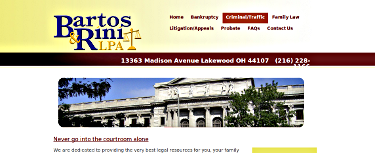
I have a problem I can't solve:
When I go to my client's website at bartosandrini.com the *Home* tab is not highlighted, in fact a completely different tab, *Criminal/Traffic*, is highlighted. This problem showed up after one of my client's blog editors selected Promoted to front page in the *Publishing options* section.
[image: original.png]
These are my settings across the site
In *Site Configuration* *>* *Site Information*(or /admin/settings/site-information)
Default front page: *http://bartosandrini.com/ The home page displays content from this relative URL. If unsure, specify "node".
In the footer section on the same page and I am using <a href="/"><u>Home</u></a>
In *Site Building* *>* *Menus* *>* *Primary Links* (or /admin/build/menu/item/1964/edit)
Menu settings Path: * The path this menu item links to. This can be an internal Drupal path such as *node/add* or an external URL such as *http://drupal.org*. Enter *<front> * to link to the front page. Menu link title: * The link text corresponding to this item that should appear in the menu.
In *Site Building* *>* *Blocks* after selecting configure for the rotor in the content top block (or /admin/build/block/configure/views/rotor-block_1)
Page specific visibility settingshttp://bartosandrini.com/admin/build/block/configure/views/rotor-block_1# Show block on specific pages: Show on every page except the listed pages. Show on only the listed pages. Show if the following PHP code returns TRUE (PHP-mode, experts only). Pages: Enter one page per line as Drupal paths. The '*' character is a wildcard. Example paths are *blog* for the blog page and *blog/** for every personal blog. *<front>* is the front page. If the PHP-mode is chosen, enter PHP code between *<?php ?>*. Note that executing incorrect PHP-code can break your Drupal site.
This problem first occurred in January and below is a copy of the advice I received. Initially, this worked for me. This advice does not work and I really don't know what to do or how to troubleshoot this.
Comments I think http://drupal.org/node/678758#comment-2449442 Posted by ludo1960 http://drupal.org/user/216916 on *January 8, 2010 at 12:45am*
The URL path settings should be front and not home.
- reply http://drupal.org/comment/reply/678758/2449442
did not work for me http://drupal.org/node/678758#comment-2452634 Posted by fndtn357 http://drupal.org/user/255723 on *January 8, 2010 at 5:25pm*
I did that but I am still unable to see the Home tab highlighted in the Primary menu. Any ideas?
"The skill of coding is to create a context in which other people can contribute."
- reply http://drupal.org/comment/reply/678758/2452634
In admin http://drupal.org/node/678758#comment-2452748 Posted by ludo1960 http://drupal.org/user/216916 on *January 8, 2010 at 5:57pm*
Check admin/build/path/list that the alias exists, if not create it
- reply http://drupal.org/comment/reply/678758/2452748
alias exists in one part of the listhttp://drupal.org/node/678758#comment-2453242 Posted by fndtn357 http://drupal.org/user/255723 on *January 8, 2010 at 9:02pm*
in a filtered list *nodes*, I see node/33 = node/33 and if I try to change that it says that home is already being used. Without a filter, home = node/33. Is this something I should change in the database so that forward or reverse it says home = node/33 and node/33 = home? Or should I delete the extra node/33 listing?
"The skill of coding is to create a context in which other people can contribute."
- reply http://drupal.org/comment/reply/678758/2453242
Repeat http://drupal.org/node/678758#comment-2453252 Posted by ludo1960 http://drupal.org/user/216916 on *January 8, 2010 at 9:05pm*
Check admin/build/path/list that the alias exists, if not create it
- reply http://drupal.org/comment/reply/678758/2453252
exists http://drupal.org/node/678758#comment-2453278 Posted by fndtn357 http://drupal.org/user/255723 on *January 8, 2010 at 9:14pm*
*home* is an Alias and *node/33* is in System.
"The skill of coding is to create a context in which other people can contribute."
- reply http://drupal.org/comment/reply/678758/2453278
ok http://drupal.org/node/678758#comment-2453292 Posted by ludo1960 http://drupal.org/user/216916 on *January 8, 2010 at 9:19pm*
delete that and start again, on the site info page make front page: node
Then make you menu path <front> call it anything you want ie Home
- reply http://drupal.org/comment/reply/678758/2453292
wow! Thanks a lot. http://drupal.org/node/678758#comment-2453380 Posted by fndtn357 http://drupal.org/user/255723 on *January 8, 2010 at 9:44pm*
That worked. Should I leave everything as is now? And moreover how did I get it so confused? Did I not read correctly somewhere down the line? I reset this (I don't remember how now) a few times and every time I ran a major update it changed itself. Do you think this might happen again?
"The skill of coding is to create a context in which other people can contribute."
- reply http://drupal.org/comment/reply/678758/2453380
If it... http://drupal.org/node/678758#comment-2453388 Posted by ludo1960 http://drupal.org/user/216916 on *January 8, 2010 at 9:46pm*
..works, then dont break it! :)
- reply http://drupal.org/comment/reply/678758/2453388
Any help would be greatly appreciated with this issue.