
Hey there, I just have a few beginner questions.
1) I tried adding a text field and text area to one of our Content types - an "Article". But I am not seeing any new content / text after I add some to one of the articles. What do I have to do to see those text changes in my page? Is there some kind of caching issue here?
2) I've made some changes to a template php file (and associated CSS). But those changes aren't being reflected in the pages served. Is there a caching issue here? Or does some file(s) need to be re-indexed?
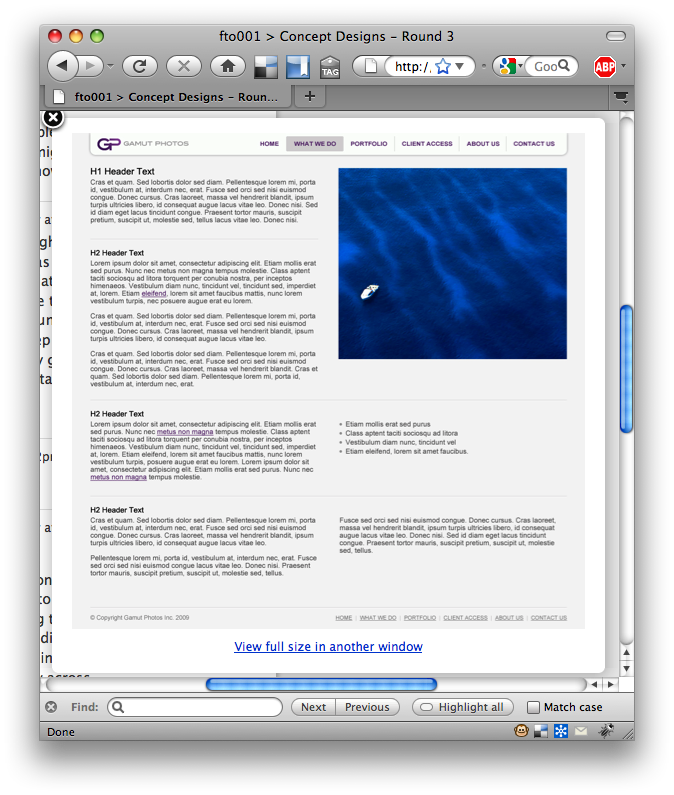
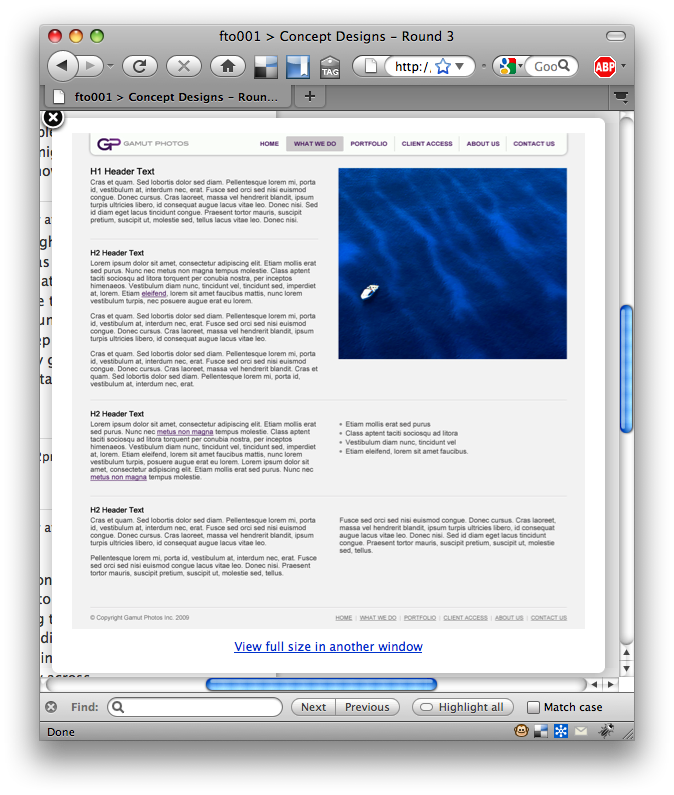
3) With Drupal's content editor is there a way to do like here: http://digitalrhino.projectpath.com/projects/2836732/thumbnails/27705922
* make an image to span 2 fields * have text split into 2 columns 4) How do you manage the homepage that Drupal uses? I had a user delete the homepage and now I need to recreate it. But this doesn't seem to be a straightforward process.
Thanks for any help Tim
__________________________________________________________________ Get the name you've always wanted @ymail.com or @rocketmail.com! Go to http://ca.promos.yahoo.com/jacko/

- I tried adding a text field and text area to one of our Content types -
an "Article". But I am not seeing any new content / text after I add some to one of the articles. What do I have to do to see those text changes in my page? Is there some kind of caching issue here?
Check out permissions in user settings, you have to allow users to see cck fields.
- I've made some changes to a template php file (and associated CSS). But
those changes aren't being reflected in the pages served. Is there a caching issue here? Or does some file(s) need to be re-indexed?
go to performance in the site configuration menu and clear the cache. Also install the theme developer module to ensure your tpls are gtting picked up OK
- With Drupal's content editor is there a way to do like here:
http://digitalrhino.projectpath.com/projects/2836732/thumbnails/27705922
- make an image to span 2 fields
- have text split into 2 columns
You probably want fckeditor or www.drupal.org/project/wysiwyg
- How do you manage the homepage that Drupal uses? I had a user delete the
homepage and now I need to recreate it. But this doesn't seem to be a straightforward process.
/node should be a normal 'river of content' view. I would worry more about users being able to change the homepage atm than recreating it.
Thanks for any help Tim
Be smarter than spam. See how smart SpamGuard is at giving junk email the boot with the *All-new Yahoo! Mail *http://ca.promos.yahoo.com/newmail/overview2/
-- [ Drupal support list | http://lists.drupal.org/ ]

Tim, Steve, and all,
To add a bit of nuance to Steve's answer. It's possible he's right on with the cck field permissions issue. Note though, that if the sub-module in cck called "Content Permissions" (see in the module listing page in the cck ssction at admin/build/modules/list) is turned off (unchecked) then this will not be the issue. If this is indeed the problem, that you have "Content Permissions" turned on, rather then set all those permissions, I would turn the module off, if you don't need it. It really complexifies the the permissions page, and you can always add it back later if you don't need it. That module used to be called "field permissions" which I think is a better name. With that module turned off you can still restrict access on a node by node basis (with content_access or another module) or build in with Drupal you have role-based access. The "Content Permissions" module is required when you want to restrict certain fields within a content type to specific user roles. It's a great feature; I'm just saying if you don't need it, don't use it (that's true for a lot of things in Drupal).
Best,
Shai
On Tue, Jul 21, 2009 at 10:18 AM, Steve Power steev@initsix.co.uk wrote:
- I tried adding a text field and text area to one of our Content types -
an "Article". But I am not seeing any new content / text after I add some to one of the articles. What do I have to do to see those text changes in my page? Is there some kind of caching issue here?
Check out permissions in user settings, you have to allow users to see cck fields.
- I've made some changes to a template php file (and associated CSS). But
those changes aren't being reflected in the pages served. Is there a caching issue here? Or does some file(s) need to be re-indexed?
go to performance in the site configuration menu and clear the cache. Also install the theme developer module to ensure your tpls are gtting picked up OK
- With Drupal's content editor is there a way to do like here:
http://digitalrhino.projectpath.com/projects/2836732/thumbnails/27705922
- make an image to span 2 fields
- have text split into 2 columns
You probably want fckeditor or www.drupal.org/project/wysiwyg
- How do you manage the homepage that Drupal uses? I had a user delete
the homepage and now I need to recreate it. But this doesn't seem to be a straightforward process.
/node should be a normal 'river of content' view. I would worry more about users being able to change the homepage atm than recreating it.
Thanks for any help Tim
Be smarter than spam. See how smart SpamGuard is at giving junk email the boot with the *All-new Yahoo! Mail *http://ca.promos.yahoo.com/newmail/overview2/
-- [ Drupal support list | http://lists.drupal.org/ ]
--
-- Steve Power Principal Consultant Mobile: +44 (0) 7747 027 243 Initsix Technology and Media --
-- [ Drupal support list | http://lists.drupal.org/ ]
Hey guys, thanks for the feedback. See inlined comments...
________________________________ From:Steve Power steev@initsix.co.uk To:support@drupal.org Sent:Tuesday, July 21, 2009 10:18:13 AM Subject:Re: [support] Newbie Qs
- I tried adding a text field and text area to one of our Content types - an "Article". But I am not seeing any new content / text after I add some to one of the articles. What do I have to do to see those text changes in my page? Is there some kind of caching issue here?
Check out permissions in user settings, you have to allow users to see cck fields. There's no module that I can see called Content Construction Kit (CCK). But I did try enabling anonymous and authenticated user access to view all fields in the "content_permissions module" module. As well, all users can view all "views" modules.
Now the page isn't even showing up (see http://fto.digitalrhino.biz/whatwedo), even though all pages are published. This is confusing :|
2) I've made some changes to a template php file (and associated CSS). But those changes aren't being reflected in the pages served. Is there a caching issue here? Or does some file(s) need to be re-indexed? go to performance in the site configuration menu and clear the cache. Also install the theme developer module to ensure your tpls are gtting picked up OK Ok, got this one. Thanks :)
3) With Drupal's content editor is there a way to do like here: http://digitalrhino.projectpath.com/projects/2836732/thumbnails/27705922
- make an image to span 2 fields
- have text split into 2 columns
You probably want fckeditor or www.drupal.org/project/wysiwyg I'll check out the fckeditor.
4) How do you manage the homepage that Drupal uses? I had a user delete the homepage and now I need to recreate it. But this doesn't seem to be a straightforward process. /node should be a normal 'river of content' view. I would worry more about users being able to change the homepage atm than recreating it. I don't quite follow this. How can a user (anonymous or authenticated) control what homepage appears? Or why would I want that to happen? In this case, I just want one homepage to appear all the time, and I can't see where to set that. This is obviously my lack of understanding of how Drupal handles this.
Thanks a lot Tim
__________________________________________________________________ Looking for the perfect gift? Give the gift of Flickr!
hello again mate
site configuraion>site information should have url for frontpage you can set it there. /node is the default front page (it just displays everything in date order, hence 'river of content') - http://fto.digitalrhino.biz/node is what i mean
your front page is a bit fubar, and im not sure how to help you with the CCK stuff! dont know how you managed to do all this without CCK (its been so long since i used anything but CCK ! )
http://fto.digitalrhino.biz/gallery/Gallery-1
have you enabled the option 'access content'?
also, in the content types, it may be disabled or hidden in the display options (guess/unlikely)
On Tue, Jul 21, 2009 at 5:01 PM, Timothy Washington < timothyjwashington@yahoo.ca> wrote:
Hey guys, thanks for the feedback. See inlined comments...
*From:* Steve Power steev@initsix.co.uk *To:* support@drupal.org *Sent:* Tuesday, July 21, 2009 10:18:13 AM *Subject:* Re: [support] Newbie Qs
- I tried adding a text field and text area to one of our Content types -
an "Article". But I am not seeing any new content / text after I add some to one of the articles. What do I have to do to see those text changes in my page? Is there some kind of caching issue here?
Check out permissions in user settings, you have to allow users to see cck fields. There's no module that I can see called Content Construction Kit (CCK). But I did try enabling anonymous and authenticated user access to view all fields in the "content_permissions module" module. As well, all users can view all "views" modules.
Now the page isn't even showing up (see http://fto.digitalrhino.biz/whatwedo), even though all pages are published. This is confusing :|
- I've made some changes to a template php file (and associated CSS). But
those changes aren't being reflected in the pages served. Is there a caching issue here? Or does some file(s) need to be re-indexed?
go to performance in the site configuration menu and clear the cache. Also install the theme developer module to ensure your tpls are gtting picked up OK Ok, got this one. Thanks :)
- With Drupal's content editor is there a way to do like here:
http://digitalrhino.projectpath.com/projects/2836732/thumbnails/27705922
- make an image to span 2 fields
- have text split into 2 columns
You probably want fckeditor or www.drupal.org/project/wysiwyg
I'll check out the fckeditor.
- How do you manage the homepage that Drupal uses? I had a user delete
the homepage and now I need to recreate it. But this doesn't seem to be a straightforward process.
/node should be a normal 'river of content' view. I would worry more about users being able to change the homepage atm than recreating it. I don't quite follow this. How can a user (anonymous or authenticated) control what homepage appears? Or why would I want that to happen? In this case, I just want one homepage to appear all the time, and I can't see where to set that. This is obviously my lack of understanding of how Drupal handles this.
Thanks a lot Tim
Ask a question on any topic and get answers from real people. *Go to Yahoo! Answers.* http://ca.answers.yahoo.com
-- [ Drupal support list | http://lists.drupal.org/ ]
Ok, CCK is installed as it turns out. And I got the homepage back up, thanks so much guys for the help. I had to reset my content name (and alias) to a proper name. Now I'm going to look into installing fckeditor for creating content like what you see in the attachment. More soon.
Thanks a lot to both of you Tim
________________________________ From: Steve Power steev@initsix.co.uk To: support@drupal.org Sent: Tuesday, July 21, 2009 12:22:32 PM Subject: Re: [support] Newbie Qs
hello again mate
site configuraion>site information should have url for frontpage you can set it there. /node is the default front page (it just displays everything in date order, hence 'river of content') - http://fto.digitalrhino.biz/node is what i mean
your front page is a bit fubar, and im not sure how to help you with the CCK stuff! dont know how you managed to do all this without CCK (its been so long since i used anything but CCK ! )
http://fto.digitalrhino.biz/gallery/Gallery-1
have you enabled the option 'access content'?
also, in the content types, it may be disabled or hidden in the display options (guess/unlikely)
On Tue, Jul 21, 2009 at 5:01 PM, Timothy Washington timothyjwashington@yahoo.ca wrote:
Hey guys, thanks for the feedback. See inlined comments...
________________________________ From:Steve Power steev@initsix.co.uk
To:support@drupal.org Sent:Tuesday, July 21, 2009 10:18:13 AM Subject:Re: [support] Newbie Qs
- I tried adding a text field and text area to one of our Content types - an "Article". But I am not seeing any new content / text after I add some to one of the articles. What do I have to do to see those text changes in my page? Is there some kind of caching issue here?
Check out permissions in user settings, you have to allow users to see cck fields. There's no module that I can see called Content Construction Kit (CCK). But I did try enabling anonymous and authenticated user access to view all fields in the "content_permissions module" module. As well, all users can view all "views" modules.
Now the page isn't even showing up (see http://fto.digitalrhino.biz/whatwedo), even though all pages are published. This is confusing :|
- I've made some changes to a template php file (and associated CSS). But those changes aren't being reflected in the pages served. Is there a caching issue here? Or does some file(s) need to be re-indexed?
go to performance in the site configuration menu and clear the cache. Also install the theme developer module to ensure your tpls are gtting picked up OK Ok, got this one. Thanks :)
- With Drupal's content editor is there a way to do like here: http://digitalrhino.projectpath.com/projects/2836732/thumbnails/27705922
- make an image to span 2 fields
- have text split into 2 columns
You probably want fckeditor or www.drupal.org/project/wysiwyg I'll check out the fckeditor.
- How do you manage the homepage that Drupal uses? I had a user delete the homepage and now I need to recreate it. But this doesn't seem to be a straightforward process.
/node should be a normal 'river of content' view. I would worry more about users being able to change the homepage atm than recreating it.
I don't quite follow this. How can a user (anonymous or authenticated) control what homepage appears? Or why would I want that to happen? In this case, I just want one homepage to appear all the time, and I can't see where to set that. This is obviously my lack of understanding of how Drupal handles this.
Thanks a lot Tim
Ask a question on any topic and get answers from real people. Go to Yahoo! Answers.
--
[ Drupal support list | http://lists.drupal.org/ ]
CCK has its own fieldset on the modules listing page. The main module there is called "Content".
If you have Content Permisssions, then you definitely have CCK, you wouldn't be able to create custom fields without it.
You set a universal home page for your site at: admin/settings/site-information It says, "Default Front Page" at the bottom.
Don't give everyone permission to see "All views" that essentially disables the role based permission you create for every view that you create. Views are often created for admin purposes and even if you set permissions on that individual view, the "see all views" permission trumps what you did in the view set up. So that was a bad choice.
Good luck,
Shai
On Tue, Jul 21, 2009 at 12:01 PM, Timothy Washington < timothyjwashington@yahoo.ca> wrote:
Hey guys, thanks for the feedback. See inlined comments...
*From:* Steve Power steev@initsix.co.uk *To:* support@drupal.org *Sent:* Tuesday, July 21, 2009 10:18:13 AM *Subject:* Re: [support] Newbie Qs
- I tried adding a text field and text area to one of our Content types -
an "Article". But I am not seeing any new content / text after I add some to one of the articles. What do I have to do to see those text changes in my page? Is there some kind of caching issue here?
Check out permissions in user settings, you have to allow users to see cck fields. There's no module that I can see called Content Construction Kit (CCK). But I did try enabling anonymous and authenticated user access to view all fields in the "content_permissions module" module. As well, all users can view all "views" modules.
Now the page isn't even showing up (see http://fto.digitalrhino.biz/whatwedo), even though all pages are published. This is confusing :|
- I've made some changes to a template php file (and associated CSS). But
those changes aren't being reflected in the pages served. Is there a caching issue here? Or does some file(s) need to be re-indexed?
go to performance in the site configuration menu and clear the cache. Also install the theme developer module to ensure your tpls are gtting picked up OK Ok, got this one. Thanks :)
- With Drupal's content editor is there a way to do like here:
http://digitalrhino.projectpath.com/projects/2836732/thumbnails/27705922
- make an image to span 2 fields
- have text split into 2 columns
You probably want fckeditor or www.drupal.org/project/wysiwyg
I'll check out the fckeditor.
- How do you manage the homepage that Drupal uses? I had a user delete
the homepage and now I need to recreate it. But this doesn't seem to be a straightforward process.
/node should be a normal 'river of content' view. I would worry more about users being able to change the homepage atm than recreating it. I don't quite follow this. How can a user (anonymous or authenticated) control what homepage appears? Or why would I want that to happen? In this case, I just want one homepage to appear all the time, and I can't see where to set that. This is obviously my lack of understanding of how Drupal handles this.
Thanks a lot Tim
Ask a question on any topic and get answers from real people. *Go to Yahoo! Answers.* http://ca.answers.yahoo.com
-- [ Drupal support list | http://lists.drupal.org/ ]
Tim,
Welcome to Drupal... it's awesome... hand in there with the learning curve.
1. Check here: admin/content/node-type/page/display (change "page" to be the content-type you are dealing with. Or just go to: admin/content/types then click "manage fields" and then "display fields." However, I believe the default after adding fields is for them to display. So your story is curious. It's always a good idea to clear cache! However, if you are logged in while viewing the page I doubt it is a caching issue. (FYI its real easy to clear cache when you have the following two modules installed: devel admin_menu) Write back with more details if this persists. You can also clear cache at the bottom of: admin/settings/performance
2. Which .tpl file did you change and which theme are you using? Note that it can be confusing at the beginning when to change page.tpl.php or node.tpl.php. You do need to clear the theme registry after changing a .tpl page. To clear the theme registry, go to the theme settings page for the theme you are using. Here is the theme settings page for Garland:
admin/build/themes/settings/garland
Then click save at the bottom (even if you didn't change anything) and your theme registry will be cleared.
3. Your URL that you gave for the example required a log-in, do you have a screen shot? I don't really know what you mean by make an image span two fields. "Have text split into two columns. With the views module it's very simple to output fields in tabular format. If you mean, "Can I present content in one field in tabular format?" The answer is yes. As long as that field is not "plain" text (set when you set up the field) and the input format that you choose when doing data entry allows the html tags you need (e.g. <table>), then you can do anything you want. If you use the "full html" input format that will surely work, though be careful with that not to give privilege to use full html to too many people. You can add allowable tags to the filtered html input format.
4. The home page in Drupal is set at the site information screen: admin/settings/site-information You can set it to any URL. It could be an individual node, a view a panel page (if you have Panels installed), whatever. It's possible the content was not deleted. I always recommend newbies to visit the content listing page often, cause that usually answers the question, "Where did my stuff go?" dmin/content/node/overview
Good luck,
Shai Content2zero Web Development http://content2zero.com/portfolio
On Tue, Jul 21, 2009 at 9:58 AM, Timothy Washington < timothyjwashington@yahoo.ca> wrote:
Hey there, I just have a few beginner questions.
- I tried adding a text field and text area to one of our Content types -
an "Article". But I am not seeing any new content / text after I add some to one of the articles. What do I have to do to see those text changes in my page? Is there some kind of caching issue here?
- I've made some changes to a template php file (and associated CSS). But
those changes aren't being reflected in the pages served. Is there a caching issue here? Or does some file(s) need to be re-indexed?
- With Drupal's content editor is there a way to do like here:
http://digitalrhino.projectpath.com/projects/2836732/thumbnails/27705922
- make an image to span 2 fields
- have text split into 2 columns
- How do you manage the homepage that Drupal uses? I had a user delete the
homepage and now I need to recreate it. But this doesn't seem to be a straightforward process.
Thanks for any help Tim
Be smarter than spam. See how smart SpamGuard is at giving junk email the boot with the *All-new Yahoo! Mail *http://ca.promos.yahoo.com/newmail/overview2/
-- [ Drupal support list | http://lists.drupal.org/ ]
Hey there, see inlined comments...
________________________________ From:Shai Gluskin shai@content2zero.com To:support@drupal.org Sent:Tuesday, July 21, 2009 10:30:36 AM Subject:Re: [support] Newbie Qs
Tim,
Welcome to Drupal... it's awesome... hand in there with the learning curve.
1. Check here: admin/content/node-type/page/display (change "page" to be the content-type you are dealing with. Or just go to: admin/content/types then click "manage fields" and then "display fields." However, I believe the default after adding fields is for them to display. So your story is curious. It's always a good idea to clear cache! However, if you are logged in while viewing the page I doubt it is a caching issue. (FYI its real easy to clear cache when you have the following two modules installed: devel admin_menu) Write back with more details if this persists. You can also clear cache at the bottom of: admin/settings/performance Indeed I wasn't able to see the new fields after I added them. I don't know what switch was flipped off. Now the page isn't even showing after fiddling with user permissions to view the fields (and the content is definitely published). I also cleared the cache, but I need to see the pages now to see if that worked.
2. Which .tpl file did you change and which theme are you using? Note that it can be confusing at the beginning when to change page.tpl.php or node.tpl.php. You do need to clear the theme registry after changing a .tpl page. To clear the theme registry, go to the theme settings page for the theme you are using. Here is the theme settings page for Garland: - admin/build/themes/settings/garland Then click save at the bottom (even if you didn't change anything) and your theme registry will be cleared. The files I am using are: ./sites/all/themes/gamut/node-<my_files>.tpl.php. It's hard to know which CSS applies though. I've tried to directly insert style elements that turn off image repeating in the element, but I'm still getting the problem seen here: http://fto.digitalrhino.biz/gallery/Gallery-1
3. Your URL that you gave for the example required a log-in, do you have a screen shot? I don't really know what you mean by make an image span two fields. "Have text split into two columns. With the views module it's very simple to output fields in tabular format. If you mean, "Can I present content in one field in tabular format?" The answer is yes. As long as that field is not "plain" text (set when you set up the field) and the input format that you choose when doing data entry allows the html tags you need (e.g. <table>), then you can do anything you want. If you use the "full html" input format that will surely work, though be careful with that not to give privilege to use full html to too many people. You can add allowable tags to the filtered html input format. Oh, sorry about that. See attached image.
4. The home page in Drupal is set at the site information screen: admin/settings/site-information You can set it to any URL. It could be an individual node, a view a panel page (if you have Panels installed), whatever. It's possible the content was not deleted. I always recommend newbies to visit the content listing page often, cause that usually answers the question, "Where did my stuff go?" dmin/content/node/overview Let me check this out.
Thanks a lot Tim
__________________________________________________________________ Looking for the perfect gift? Give the gift of Flickr!
-
 Shai Gluskin
 -
 Steve Power
 -
 Timothy Washington