
[ Ubuntu; Drupal 7 ]
Are there any conflicts between Zen 7.x-5.x (the "new and improved" version of Zen) and Nice Menus 7.x-2.1?
I am having problems with Nice Menus (placed in the Navigation region).
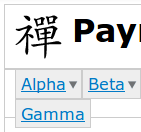
In particular, (1) the three top-level menu items are in two rows as shown here:
Also, (2) the sub-menus aren't appearing when I hover or mouse down on the items with an "expansion arrow". The "arrows" suggest that, in fact, the sub-menus are in some sense recognized ...
I know I'm leaving out a lot of detail, but I wanted to first make a quick check here (I've already looked online for solutions) in case there are any known incompatibility issues.
Note that I have another site working fine with Nice Menus using the 7.x-3.x version of Zen. I've tried my best to compare the two sites to detect any different configurations &etc , but all I have been able to find are the two different versions of Zen.
If no one here knows anything, I'll go ahead and send something to the Zen "issues queue.
Thanks for your help!

I am using nice menus with a zen 7.5 subtheme without problems. I would send you to the site, but the content is still confidential, thus protected.
These are the versions (newest): Zen (zen) 7.x-5.1 Nice Menus (nice_menus) 7.x-2.1 (Centos, Drupal 7.15)
To test it for you, I just changed the default theme to zen (instead of the subtheme), and put the nice_menus menu into the navigation bar (main menu, menu-style: down). Everything looks fine on my site.
Sorry, it's not very helpful to you. Hope you'll find your problem!
Best regards, Ursula
On Wed, Aug 22, 2012 at 6:30 AM, Kenneth Jacker khj@be.cs.appstate.edu wrote:
[ Ubuntu; Drupal 7 ]
Are there any conflicts between Zen 7.x-5.x (the "new and improved" version of Zen) and Nice Menus 7.x-2.1?
I am having problems with Nice Menus (placed in the Navigation region).
In particular, (1) the three top-level menu items are in two rows as shown here:
Also, (2) the sub-menus aren't appearing when I hover or mouse down on the items with an "expansion arrow". The "arrows" suggest that, in fact, the sub-menus are in some sense recognized ...
I know I'm leaving out a lot of detail, but I wanted to first make a quick check here (I've already looked online for solutions) in case there are any known incompatibility issues.
Note that I have another site working fine with Nice Menus using the 7.x-3.x version of Zen. I've tried my best to compare the two sites to detect any different configurations &etc , but all I have been able to find are the two different versions of Zen.
If no one here knows anything, I'll go ahead and send something to the Zen "issues queue.
Thanks for your help!
Prof Kenneth H Jacker khj@cs.appstate.edu Computer Science Dept www.cs.appstate.edu/~khj Appalachian State Univ Boone, NC 28608 USA
-- [ Drupal support list | http://lists.drupal.org/ ]
Thanks for your comments, Ursula!
up> I am using nice menus with a zen 7.5 subtheme without problems.
I don't understand "zen 7.5". Is there a more complete name/version?
up> I would send you to the site, but the content is still up> confidential, thus protected.
Understood!
up> To test it for you, I just changed the default theme to zen (instead up> of the subtheme), and put the nice_menus menu into the navigation bar up> (main menu, menu-style: down). Everything looks fine on my site.
Strange ...
Further testing on my end turned something up: if I *log out* of admin mode, every thing works correctly! However, after logging in to an admin account, the menu reverts to that shown in the image sent previously.
Thinking it might have something to do with the (very useful) "admin menus", I disabled them (both the 'Toolbar' module in core, and the 'Administration Menu' additional module) and cleared all caches. Made no difference.
So, all I can see is this: if I an not logged in, the menu is fine; if I login to an admin account, the menu is multi-lined and popups don't work.
The Nice Menus "issue queue" has this related "closed" entry:
http://drupal.org/node/1528900
But its solution (remove Simple Menus) doesn't apply to my setup since I'm not using that module.
Any other ideas?
Thanks,
-Kenneth
-
 Kenneth Jacker
 -
 Ursula Pieper