
I can't seem to affect any change on the display of general description information for content types for non-logged in users.
Specifically, I've added descriptions using the
Admminister > Content > Configure > Content Types > [individ. config]
Or, by URL, using
?q=admin/node/configure/types
So, I edit the 'Explanation or submission guidelines:' field for the 'book' type, for example, and all is well.
But, when I view as an anonymous user, and click
Content > Books
All I get is the heading 'Books' and then nothing (there are no books presently.)
I would like the description of the Book Content Type to appear, describing what 'Books' are (as I've entered the description.)
Where should I be looking for such a setting/switch/code edit?
(I want to encourage anonymous users to register, but if they explore the site trying to get a feel for what they can do, they see blank pages. Not good. ;)
Thanks in advance, Drupal folkies. -- Gary

On Wednesday 12 April 2006 11:12 am, Lists wrote:
I can't seem to affect any change on the display of general description information for content types for non-logged in users.
Specifically, I've added descriptions using the
Admminister > Content > Configure > Content Types > [individ. config]
Or, by URL, using
?q=admin/node/configure/types
So, I edit the 'Explanation or submission guidelines:' field for the 'book' type, for example, and all is well.
But, when I view as an anonymous user, and click
Content > BooksAll I get is the heading 'Books' and then nothing (there are no books presently.)
This method will not get you what you want.
I would like the description of the Book Content Type to appear, describing what 'Books' are (as I've entered the description.)
Where should I be looking for such a setting/switch/code edit?
Try allowing access in administer >> access control.
(I want to encourage anonymous users to register, but if they explore the site trying to get a feel for what they can do, they see blank pages. Not good. ;)
The permissions are not that fine-grained. If you do not allow access to view the node, then you do not allow access to view the menu. You would either have to create custom menus that point to the disabled nodes (which become enabled when they log in), or modify code to allow different access.
"Jason Flatt" wrote:
So, I edit the 'Explanation or submission guidelines:' field for the 'book' type, for example, and all is well.
But, when I view as an anonymous user, and click
Content > BooksAll I get is the heading 'Books' and then nothing (there are no books presently.)
This method will not get you what you want.
I would like the description of the Book Content Type to appear, describing what 'Books' are (as I've entered the description.)
Where should I be looking for such a setting/switch/code edit?
Try allowing access in administer >> access control.
(I want to encourage anonymous users to register, but if they explore the site trying to get a feel for what they can do, they see blank pages. Not good. ;)
The permissions are not that fine-grained. If you do not allow access to view the node, then you do not allow access to view the menu. You would either have to create custom menus that point to the disabled nodes (which become enabled when they log in), or modify code to allow different access.
I'm not talking about menus. Perhaps I wasn't very clear.
I'm talking about the 'body content' description which (is to) appear beneath the 'Books' header, once someone clicks the menu item to view book content. -- Gary

On 4/12/06, Lists listout@accidentaltechie.org wrote:
I'm not talking about menus. Perhaps I wasn't very clear.
I'm talking about the 'body content' description which (is to) appear beneath the 'Books' header, once someone clicks the menu item to view book content.
You want to use the body content description in a place it wasn't intended to go.
You will need to hack your theme or module file (either of those could do it) to get this behavior. I recommend hacking the theme file, because hacking core files is generally considered to be a "no no" unless you are going to hack it in a way that is generally useful and you plan on contributing that back to core as a patch.
Regards, Greg
-- Growing Venture Solutions | Denver, CO Technology Solutions for Communities and Small Businesses http://growingventuresolutions.com/
"Greg Knaddison - GVS" wrote:
On 4/12/06, Lists listout@accidentaltechie.org wrote:
I'm not talking about menus. Perhaps I wasn't very clear.
I'm talking about the 'body content' description which (is to) appear beneath the 'Books' header, once someone clicks the menu item to view book content.
You want to use the body content description in a place it wasn't intended to go.
No. Arrgh. No!
I want it to show under the title of the thing it is describing.
Maybe I'll turn this into a question:
When one enters a description for the content type, in the edit content types form, where the hell does the description ever show?
I've entered a description for 'books', but it's not on the 'books' node page.
Where is it? Why isn't it displaying?
I don't know what's "unintended" about that.
I am trying nothing special here. I just don't see (ever) any of the description that I've entered displaying on the page for creating that kind of content.
-- Gary
On 4/12/06, Lists listout@accidentaltechie.org wrote:
I want it to show under the title of the thing it is describing.
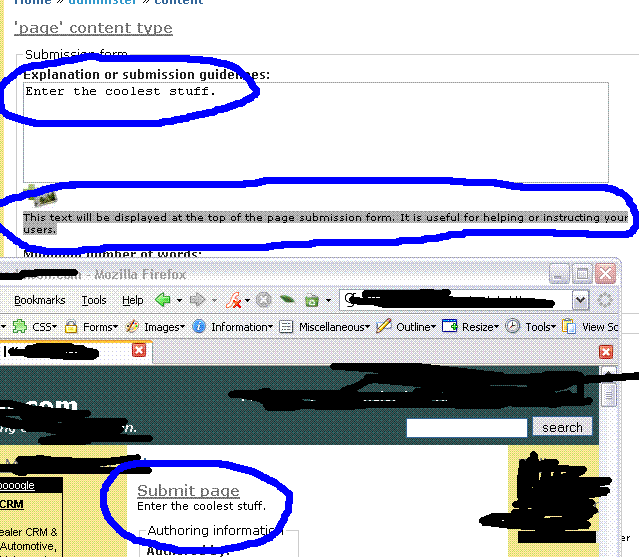
And it does do that - just not where you expect it to. When you go to node/add/book it will show right underneath the "Submit Book". If you look at the help text right underneath that box it says
"This text will be displayed at the top of the page submission form. It is useful for helping or instructing your users."
That is precisely the behavior I see.
Maybe I'll turn this into a question:
When one enters a description for the content type, in the edit content types form, where the hell does the description ever show?
I've entered a description for 'books', but it's not on the 'books' node page.
Where is it? Why isn't it displaying?
It is on the "add a book" page which is where the help text says it will show.
I don't know what's "unintended" about that.
I am trying nothing special here. I just don't see (ever) any of the description that I've entered displaying on the page for creating that kind of content.
Well then either the help text is broken on your sight or you are looking for the help text to show up somewhere other than where the module developer designed and coded it to show up.
I have attached a screenshot that shows 1) text I entered into the box you describe 2) the help text that explains where that text will appear 3) the help text I entered on the "submit a page" page (where it is intended to go)
I don't know how these lists handle attachments, but I've got you on the "to:", Gary, so at least you should get it.
NOTE: I already gave you a hint on how to get this text to show up in the place that you want it: theme files and node_ API calls. It would take less time to follow that rabbit hole than discuss the issue here.
Regards, Greg
-- Growing Venture Solutions | Denver, CO Technology Solutions for Communities and Small Businesses http://growingventuresolutions.com/
"Greg Knaddison - GVS" wrote:
On 4/12/06, I wrote:
I want it to show under the title of the thing it is describing.
And it does do that - just not where you expect it to. When you go to node/add/book it will show right underneath the "Submit Book". If you look at the help text right underneath that box it says
"This text will be displayed at the top of the page submission form. It is useful for helping or instructing your users."
That is precisely the behavior I see.
Greg, thanks kindly for your time in making a screen shot. That surely cleared up the issue of 'language' -- communicating that we are talking at right angles (slightly.)
You see this behavior, and I don't, because we are not looking in the same place at the same time.
The one key point that I made that I think maybe you mis-read:
I wrote:
I can't seem to affect any change on the display of general description information for content types for non-logged in users.
I see, now, that you are talking about _submission for logged-in users who have rights to create book content_ while I am talking about everyone.
I also wrote:
(I want to encourage anonymous users to register, but if they explore the site trying to get a feel for what they can do, they see blank pages. Not good. ;)
So, your screen shots help establish that we are not talking about the same place or set of circumstances, but also (happily) that we are not talking about impossibilities. I just need to look elsewhere to fill that particular need.
I hope to encourage non-registered users to register by allowing the understand the kinds of content they may produce. I suspect I'll have to duplicate that kind of content as an actual 'story' node type and then expose them to that 'story' rather than any actual instructions/help/descriptive text.
NOTE: I already gave you a hint on how to get this text to show up in the place that you want it: theme files and node_ API calls. It would take less time to follow that rabbit hole than discuss the issue here.
And I will follow up, now, on this line of attack, as you suggest.
Greg, thanks for your time yesterday on this, and for your encouragement (brusque as it appears at times ;) to "dive in" and dig around the code.
I'll do that, with confidence.
Much appreciated.
-- Gary
"Lists" wrote:
"Greg Knaddison - GVS" wrote:
On 4/12/06, I wrote:
I want it to show under the title of the thing it is describing.
And it does do that - just not where you expect it to. When you go to node/add/book it will show right underneath the "Submit Book". If you look at the help text right underneath that box it says
"This text will be displayed at the top of the page submission form. It is useful for helping or instructing your users."
That is precisely the behavior I see.
Greg, thanks kindly for your time in making a screen shot. That surely cleared up the issue of 'language' -- communicating that we are talking at right angles (slightly.)
You see this behavior, and I don't, because we are not looking in the same place at the same time.
The one key point that I made that I think maybe you mis-read:
I wrote:
I can't seem to affect any change on the display of general description information for content types for non-logged in users.
I see, now, that you are talking about _submission for logged-in users who have rights to create book content_ while I am talking about everyone.
I wanted to follow-up on this topic, since I have had 2 off-list messages from others asking if I've been able to address the issue, since they also do not understand why no information can be displayed to non-registered users regarding the various content types.
I have found that the 'helpedit.module' is the ticket for what I wanted to do. I would recommend trying that out to see if it also provides the features that you want for your site.
Since I was asked whether the 'help' module is supposed to do this, all I can say is that:
I have no idea what the point of the help module is. I added the help menu, and was not aware that this 'help' module is intended to be __admin help__ NOT __user help__. The menu it installs has a path like: admin/help.
This is, of course, a pointless menu item for the navigation menu, since no user (on my site) can reach it.
So...I would recommend the 'helpedit.module'. How's that?
(Thanks for those who took time to lend a hand.)
-- Gary

On Apr 12, 2006, at 12:12 PM, Lists wrote:
(I want to encourage anonymous users to register, but if they explore the site trying to get a feel for what they can do, they see blank pages. Not good. ;)
Are you using 4.7 or cvs? Check out the new Premium module by Allie Micka. It grants separate access privileges for different user roles on the same node.
http://drupal.org/project/premium
Laura
-
 Greg Knaddison - GVS
 -
 Jason Flatt
 -
 Laura Scott
 -
 Lists
Lists