
I suspect that the css in my theme is somehow not configured correctly. Now when I do changes in the CSS I don't see the changes on my site even though I can see the proper and edited css files on the server. When I look in chrome developer tools (or firefox firebug) I see weird css file names .... see attached. Any ideas or similar experience? Thanks
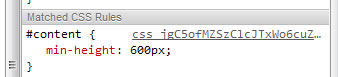

It sounds like you have CSS optimization enabled at admin/settings/performance.
Steve
On Aug 15, 2011, at 4:56 PM, tony maciejowski wrote:
I suspect that the css in my theme is somehow not configured correctly. Now when I do changes in the CSS I don't see the changes on my site even though I can see the proper and edited css files on the server. When I look in chrome developer tools (or firefox firebug) I see weird css file names .... see attached. Any ideas or similar experience? Thanks
-- tony maciejowski | analyst/programmer | websites | tony@tony-mac.com
Twitter: anntosh | Cell: 323.899.6206 | Linked-In: Anthony Maciejowski
<CSSProb.jpg>-- [ Drupal support list | http://lists.drupal.org/ ]
Thanks! What is the optimization supposed to do/good for? Tony Sent on the Sprint® Now Network from my BlackBerry®
-----Original Message----- From: Steve Edwards killshot91@gmail.com Sender: support-bounces@drupal.org Date: Mon, 15 Aug 2011 16:58:26 To: support@drupal.org Reply-To: support@drupal.org Subject: Re: [support] Theme css

btw, from what I've seen a single large css file downloads a lot faster than 40 small ones too.
-Don-
On 8/15/2011 8:04 PM, tony@tony-mac.com wrote:
Thanks! What is the optimization supposed to do/good for? Tony Sent on the Sprint® Now Network from my BlackBerry®
-----Original Message----- From: Steve Edwardskillshot91@gmail.com Sender: support-bounces@drupal.org Date: Mon, 15 Aug 2011 16:58:26 To:support@drupal.org Reply-To: support@drupal.org Subject: Re: [support] Theme css
Thanks guys. That was the trick and the world is back to it's proper rotation. Was driving me crazy!
Sent on the Sprint® Now Network from my BlackBerry®
-----Original Message----- From: Don donald@fane.com Sender: support-bounces@drupal.org Date: Mon, 15 Aug 2011 20:42:01 To: support@drupal.org Reply-To: support@drupal.org Subject: Re: [support] Theme css
btw, from what I've seen a single large css file downloads a lot faster than 40 small ones too.
-Don-
On 8/15/2011 8:04 PM, tony@tony-mac.com wrote:
Thanks! What is the optimization supposed to do/good for? Tony Sent on the Sprint® Now Network from my BlackBerry®
-----Original Message----- From: Steve Edwardskillshot91@gmail.com Sender: support-bounces@drupal.org Date: Mon, 15 Aug 2011 16:58:26 To:support@drupal.org Reply-To: support@drupal.org Subject: Re: [support] Theme css

There is a CSS file limit of 32 in IE - so turn it back on before testing with IE (it will look really strange otherwise), and before going live.
Nancy Injustice anywhere is a threat to justice everywhere. -- Dr. Martin L. King, Jr.
From: "tony@tony-mac.com"
Thanks guys. That was the trick and the world is back to it's proper rotation. Was driving me crazy!
which is probably needed for IE browsers because of file include limits. However, at the bottom of admin/settings/performance you'll see a button to clear the compressed file and recreate.
-Don-
On 8/15/2011 7:58 PM, Steve Edwards wrote:
It sounds like you have CSS optimization enabled at admin/settings/performance.
Steve
On Aug 15, 2011, at 4:56 PM, tony maciejowski wrote:
I suspect that the css in my theme is somehow not configured correctly. Now when I do changes in the CSS I don't see the changes on my site even though I can see the proper and edited css files on the server. When I look in chrome developer tools (or firefox firebug) I see weird css file names .... see attached. Any ideas or similar experience? Thanks
--
*tony maciejowski**| analyst/programmer | websites |tony@tony-mac.com mailto:t_maciejowski@hotmail.com *
*Twitter: anntosh* | *Cell: 323.899.6206* | *Linked-In:* *Anthony Maciejowski*
<CSSProb.jpg>-- [ Drupal support list | http://lists.drupal.org/ ]

Please go to admin -> configuration and turn off "Aggregate and compress CSS files".
Regards,
Sent from my iPhone
On 16 Aug, 2011, at 7:56, tony maciejowski tony@tony-mac.com wrote:
I suspect that the css in my theme is somehow not configured correctly. Now when I do changes in the CSS I don't see the changes on my site even though I can see the proper and edited css files on the server. When I look in chrome developer tools (or firefox firebug) I see weird css file names .... see attached. Any ideas or similar experience? Thanks
-- tony maciejowski | analyst/programmer | websites | tony@tony-mac.com
Twitter: anntosh | Cell: 323.899.6206 | Linked-In: Anthony Maciejowski
<CSSProb.jpg>
[ Drupal support list | http://lists.drupal.org/ ]
It is defined as "Aggregate and compress CSS files" Yet the effect was to ignore all the changes I made to the css files! Por que?
Sent on the Sprint® Now Network from my BlackBerry®
-----Original Message----- From: Edison Wong hswong3i@gmail.com Sender: support-bounces@drupal.org Date: Tue, 16 Aug 2011 08:01:44 To: support@drupal.orgsupport@drupal.org Reply-To: support@drupal.org Cc: support@drupal.orgsupport@drupal.org Subject: Re: [support] Theme css
The result is much like using cache. Since you had aggregated before, those values were still being used.
Nancy Injustice anywhere is a threat to justice everywhere. -- Dr. Martin L. King, Jr.
From: "tony@tony-mac.com" tony@tony-mac.com To: support@drupal.org Sent: Monday, August 15, 2011 11:09 PM Subject: Re: [support] Theme css
It is defined as "Aggregate and compress CSS files" Yet the effect was to ignore all the changes I made to the css files! Por que?
Sent on the Sprint® Now Network from my BlackBerry®
-----Original Message----- From: Edison Wong hswong3i@gmail.com Sender: support-bounces@drupal.org Date: Tue, 16 Aug 2011 08:01:44 To: support@drupal.orgsupport@drupal.org Reply-To: support@drupal.org Cc: support@drupal.orgsupport@drupal.org Subject: Re: [support] Theme css
-- [ Drupal support list | http://lists.drupal.org/ ] -- [ Drupal support list | http://lists.drupal.org/ ]

CSS aggregation is cached and does not refresh until cache is cleared. Thus, when you make a change to a CSS file it is not evident until you clear the Drupal cache.
One of the biggest factors in front-end performance is reducing the number of requests the browser has to make in a single page load. With non-aggregated CSS files, the browser has to make a separate HTTP request for every single file, which contributes to the overall page load time. It is imperative to front-end performance that you aggregate CSS and JS files in a production environment.
Using a tool like yslow or Firebug's Net tab can give you an idea of how many requests are being made.
Further methods to reduce requests are to aggregate remote JS files locally, and use image sprites on CSS background images to reduce the number of images.
Ancillary to the performance concern is the fact that America's sweetheart, Internet Explorer, refuses to read more than 32 stylesheets (and I *believe* 200 kB of CSS?). I don't particularly mind this bug since it is a firm reminder to always turn on aggregation.
On Mon, Aug 15, 2011 at 9:09 PM, tony@tony-mac.com wrote:
It is defined as "Aggregate and compress CSS files" Yet the effect was to ignore all the changes I made to the css files! Por que?
Sent on the Sprint® Now Network from my BlackBerry®
-----Original Message----- From: Edison Wong hswong3i@gmail.com Sender: support-bounces@drupal.org Date: Tue, 16 Aug 2011 08:01:44 To: support@drupal.orgsupport@drupal.org Reply-To: support@drupal.org Cc: support@drupal.orgsupport@drupal.org Subject: Re: [support] Theme css
-- [ Drupal support list | http://lists.drupal.org/ ] -- [ Drupal support list | http://lists.drupal.org/ ]

tony maciejowski wrote:
I suspect that the css in my theme is somehow not configured correctly. Now when I do changes in the CSS I don't see the changes on my site even though I can see the proper and edited css files on the server. When I look in chrome developer tools (or firefox firebug) I see weird css file names .... see attached. Any ideas or similar experience?
I suspect that you have CSS compression turned on in the performance administration UI. This is also the cause of your "weird css file names". The browser has cached the CSS and the expiration has yet to occur to accept the changes. When in development you do not want to set the caching of CSS or JS on.
-
 Carl Wiedemann
 -
 Don
Don -
 Earnie Boyd
 -
 Edison Wong
 -
 Ms. Nancy Wichmann
 -
 Steve Edwards
 -
 tony maciejowski
 -
tony@tony-mac.com