
We have a site that's using OG. For some reason authenticated users are seeing a double listing for each group at /og. It's only authenticated users. We're using LoginToboggan so non-authenticated users, anonymous users, Site Manager, and other roles don't see this double listing. Have used OG before but have never seen this.
Ach. Never mind. I should have looked at the project issues first. Apparently it's an issue with core:
Bob Morse wrote:
We have a site that's using OG. For some reason authenticated users are seeing a double listing for each group at /og. It's only authenticated users. We're using LoginToboggan so non-authenticated users, anonymous users, Site Manager, and other roles don't see this double listing. Have used OG before but have never seen this.

Hello,
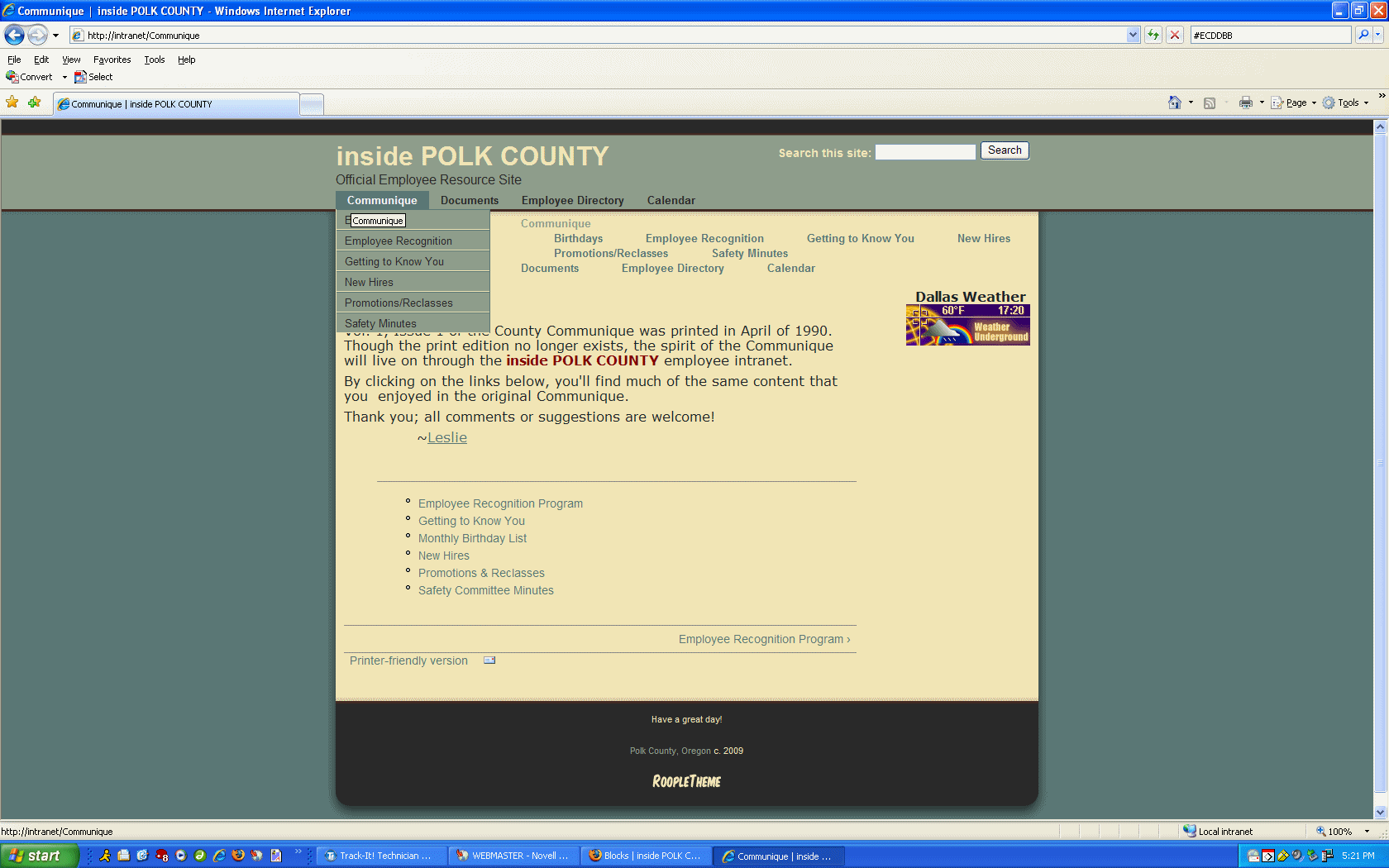
I am trying to implement suckerfish menus with the Tapestry theme. I've attached a screenshot to illustrate...The suckerfish is properly displaying the primary links and their child links, but I can't figure out how to get the primary links menu to stop also displaying in the top content area? It really looks bad when clicking on the parent item so that the child links also display....I need to just have the suckerfish menu show.
Help?
Thank you,
Leslie
Leslie Friesen Polk County Information Systems Friesen.Leslie@co.polk.or.us 503-623-0713

I just did this tonight, actually.
1. Disable all your links in Primary Links 2. Create a new menu 3. Manually copy all the links from Primary links to your new menu 4. Place the menu block into the suckerfish region
On Mon, Oct 19, 2009 at 8:27 PM, LESLIE FRIESEN < FRIESEN.LESLIE@co.polk.or.us> wrote:
Hello,
I am trying to implement suckerfish menus with the Tapestry theme. I've attached a screenshot to illustrate...The suckerfish is properly displaying the primary links and their child links, but I can't figure out how to get the primary links menu to stop also displaying in the top content area? It really looks bad when clicking on the parent item so that the child links also display....I need to just have the suckerfish menu show.
Help?
Thank you,
Leslie
Leslie Friesen Polk County Information Systems Friesen.Leslie@co.polk.or.us 503-623-0713
-- [ Drupal support list | http://lists.drupal.org/ ]

There is an easier way. On the tapestry theme settings page, unchecked the box that says primary links.
Then with block admin, place primary links into the Suckerfish region.
Shai
On Oct 20, 2009, at 12:27 AM, Margie Roswell mroswell@gmail.com wrote:
I just did this tonight, actually.
- Disable all your links in Primary Links
- Create a new menu
- Manually copy all the links from Primary links to your new menu
- Place the menu block into the suckerfish region
On Mon, Oct 19, 2009 at 8:27 PM, LESLIE FRIESEN <FRIESEN.LESLIE@co.polk.or.us
wrote:
Hello,
I am trying to implement suckerfish menus with the Tapestry theme. I've attached a screenshot to illustrate...The suckerfish is properly displaying the primary links and their child links, but I can't figure out how to get the primary links menu to stop also displaying in the top content area? It really looks bad when clicking on the parent item so that the child links also display....I need to just have the suckerfish menu show.
Help?
Thank you,
Leslie
Leslie Friesen Polk County Information Systems Friesen.Leslie@co.polk.or.us 503-623-0713
-- [ Drupal support list | http://lists.drupal.org/ ]
-- Margie http://www.BaltimoreUrbanAg.org http://www.FarmersMarketVideo.org http://www.FriendlyCoffeehouse.org http://www.packtpub.com/drupal-5-views-recipes/book
-- [ Drupal support list | http://lists.drupal.org/ ]
A quick thanks to all who answered this question for me...as always, this group is extremely helpful and it's very much appreciated!
Leslie
On 10/20/2009 at 3:48 AM, in message 2105577C-4397-4A36-B33F-B4D6FDFE7BF3@content2zero.com, Shai Gluskin shai@content2zero.com wrote:
There is an easier way. On the tapestry theme settings page, unchecked the box that says primary links.
Then with block admin, place primary links into the Suckerfish region.
Shai
On Oct 20, 2009, at 12:27 AM, Margie Roswell mroswell@gmail.com wrote:
I just did this tonight, actually.
1. Disable all your links in Primary Links 2. Create a new menu 3. Manually copy all the links from Primary links to your new menu 4. Place the menu block into the suckerfish region
On Mon, Oct 19, 2009 at 8:27 PM, LESLIE FRIESEN FRIESEN.LESLIE@co.polk.or.us wrote:
Hello,
I am trying to implement suckerfish menus with the Tapestry theme. I've attached a screenshot to illustrate...The suckerfish is properly displaying the primary links and their child links, but I can't figure out how to get the primary links menu to stop also displaying in the top content area? It really looks bad when clicking on the parent item so that the child links also display....I need to just have the suckerfish menu show.
Help?
Thank you,
Leslie
Leslie Friesen Polk County Information Systems Friesen.Leslie@co.polk.or.us 503-623-0713
-- [ Drupal support list | http://lists.drupal.org/ ]
-
 Bob Morse
 -
 LESLIE FRIESEN
 -
 Margie Roswell
 -
 Shai Gluskin