
Hi,
I am busy taking over maintainership of automember.module from njivy, and making great progress, but I have a simple layout issue that bothers me. See attached screenshot.
Is there a way to get the items inline instead of below each other as shown in the screenshot?
I have defined no '<div>' tags by means of #prefix or #suffix, so that is not the reason for this problem.
Please advice,
Thanks!
Kobus
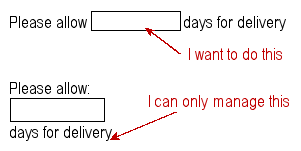

Kobus Myburgh wrote:
Hi,
I am busy taking over maintainership of automember.module from njivy, and making great progress, but I have a simple layout issue that bothers me. See attached screenshot.
Is there a way to get the items inline instead of below each other as shown in the screenshot?
I have defined no '<div>' tags by means of #prefix or #suffix, so that is not the reason for this problem.
I believe that if you wrap the form item in a <div class="container-inline"> you will achieve the effect you want:
$form['item'] = array( '#type' => 'textfield', '#prefix' => '<div class="container-inline">Please allow ', '#suffix' => ' for delivery.</div>', '#default_value' => $etc, );

On 13/02/06, Earl Miles merlin@logrus.com wrote:
I believe that if you wrap the form item in a <div class="container-inline"> you will achieve the effect you want:
Yep, a hack that IMO should not be necessary. The same method is employed to generate inline password_confirm fields.
Dodginess.
-K

Op zondag 12 februari 2006 19:35, schreef Kobus Myburgh:
Hi,
I am busy taking over maintainership of automember.module from njivy, and making great progress, but I have a simple layout issue that bothers me. See attached screenshot.
Is there a way to get the items inline instead of below each other as shown in the screenshot?
I have defined no '<div>' tags by means of #prefix or #suffix, so that is not the reason for this problem.
With some CSS you can also achieve this. However, this is only adviced if you ship with a CSS file anyway.
#yourFormElementId div { display: inline; }
Bèr
-
 Bèr Kessels
 -
 Earl Miles
 -
 Karthik
 -
 Kobus Myburgh