
Hi All,
I'm new to Drupal and this mailing list.
I'm a front-end designer and have been asked by an architect to 're- skin' a Google Sites project he has set up to share project images, plans and to-do lists with one of his clients
Google Sites does not allow access to their html / css templates for me to change the page structure and styles, so I'm looking for another platform
I've looked at project management / collaboration platforms like Basecamp and Huddle, but they seem too complex and I really want a simple interface with just the features my client needs
Is Drupal suitable for this or is there another platform that I should investigate?
Here is a summary of the most important features required:
1. Restricted access with multiple user accounts
2. Display text, images, .pdfs and videos within the website pages
3. Zoom or enlarge images and .pdfs to view details in drawings & .pdf spreadsheets
4. Include tables of information with column ordering i.e team contact list
5. Include savable checklists
6. Page templates need to be customizable through html and css
Thanks and best wishes,
Richard Wilding

Richard,
Welcome to Drupal!
Everything is quite straightforward except for two things.
Re: the checklists, I'd need to know more info about the requirements to recommend a course of action.
For the images, using imagefield in conjunction with imagecache you are good-to-go very easily.
However, I'm just not sure about zooming in on the .pdfs. It's possible/likely folks who are working on the filefield project ( http://drupal.org/project/filefield) are either working on or maybe even created what you want. I just don't know.
While there certainly is a learning curve re: Drupal's templating system --- it is amazingly powerful and flexible. You can control anything you want without hacking --- which means you can continually upgrade Drupal core and its contrib modules, keep benefiting from improvements, bug fixes etc... without having to worry that you've broken your customizations. It is totally brilliant.
Do let us know what you decide, discover, etc.
Shai <a href="http://content2zero.com">Content2zero</a>
On Thu, Feb 26, 2009 at 10:31 AM, Richard Wilding < richard@richardwilding.com> wrote:
Hi All,
I'm new to Drupal and this mailing list.
I'm a front-end designer and have been asked by an architect to 're-skin' a Google Sites project he has set up to share project images, plans and to-do lists with one of his clients
Google Sites does not allow access to their html / css templates for me to change the page structure and styles, so I'm looking for another platform
I've looked at project management / collaboration platforms like Basecamp and Huddle, but they seem too complex and I really want a simple interface with just the features my client needs
Is Drupal suitable for this or is there another platform that I should investigate?
Here is a summary of the most important features required:
Restricted access with multiple user accounts
Display text, images, .pdfs and videos within the website pages
Zoom or enlarge images and .pdfs to view details in drawings & .pdf
spreadsheets
Include tables of information with column ordering i.e team contact list
Include savable checklists
Page templates need to be customizable through html and css
Thanks and best wishes,
Richard Wilding
-- [ Drupal support list | http://lists.drupal.org/ ]
Thanks to everyone for their useful feedback on this project,
I was hoping to be able to export the architect's CAD drawings and Excel spreadsheets as .pdfs to benefit from vector quality and small file size, but for the time being maybe I'll need to export them as .png
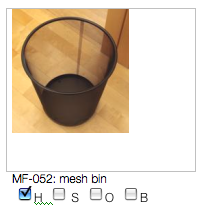
Shai, in response to your question about the saveable checklists, these would need to act like an inventory of products, so there would be a series of items, each with a title, description, image, item code and associated options to be checked / unchecked, as shown in this image:

Thanks, Richard Wilding
Richard,
Welcome to Drupal!
Everything is quite straightforward except for two things.
Re: the checklists, I'd need to know more info about the requirements to recommend a course of action.
For the images, using imagefield in conjunction with imagecache you are good-to-go very easily.
However, I'm just not sure about zooming in on the .pdfs. It's possible/likely folks who are working on the filefield project (http://drupal.org/project/filefield) are either working on or maybe even created what you want. I just don't know.
While there certainly is a learning curve re: Drupal's templating system --- it is amazingly powerful and flexible. You can control anything you want without hacking --- which means you can continually upgrade Drupal core and its contrib modules, keep benefiting from improvements, bug fixes etc... without having to worry that you've broken your customizations. It is totally brilliant.
Do let us know what you decide, discover, etc.
Shai <a href="http://content2zero.com">Content2zero</a>


On Thu, Feb 26, 2009 at 3:21 PM, Richard Wilding <richard@richardwilding.com
wrote:
Thanks to everyone for their useful feedback on this project, I was hoping to be able to export the architect's CAD drawings and Excel spreadsheets as .pdfs to benefit from vector quality and small file size, but for the time being maybe I'll need to export them as .png
Shai, in response to your question about the saveable checklists, these would need to act like an inventory of products, so there would be a series of items, each with a title, description, image, item code and associated options to be checked / unchecked, as shown in this image:
In Project Flow & Tracker tasks, listable via filters of various kinds, will be associated with user stories.
Victor
Thanks, Richard Wilding
Richard,
Welcome to Drupal!
Everything is quite straightforward except for two things.
Re: the checklists, I'd need to know more info about the requirements to recommend a course of action.
For the images, using imagefield in conjunction with imagecache you are good-to-go very easily.
However, I'm just not sure about zooming in on the .pdfs. It's possible/likely folks who are working on the filefield project ( http://drupal.org/project/filefield) are either working on or maybe even created what you want. I just don't know.
While there certainly is a learning curve re: Drupal's templating system --- it is amazingly powerful and flexible. You can control anything you want without hacking --- which means you can continually upgrade Drupal core and its contrib modules, keep benefiting from improvements, bug fixes etc... without having to worry that you've broken your customizations. It is totally brilliant.
Do let us know what you decide, discover, etc.
Shai <a href="http://content2zero.com">Content2zero</a>
-- [ Drupal support list | http://lists.drupal.org/ ]
Richard,
Something went wrong with that image you sent.
Re: the list,
Are the check boxes on/off flags to designate something, like something done on a to do list? Is the status of an item shared by all users
OR,
Is the flag status for each item unique to the user viewing the page?
Actually, for any of these scenarios, my hunch is that using the "flag" module (http://drupal.org/project/flag) in conjunction views ( http://drupal.org/project/views) would get you what you need.
Shai
On Thu, Feb 26, 2009 at 12:21 PM, Richard Wilding < richard@richardwilding.com> wrote:
Thanks to everyone for their useful feedback on this project, I was hoping to be able to export the architect's CAD drawings and Excel spreadsheets as .pdfs to benefit from vector quality and small file size, but for the time being maybe I'll need to export them as .png
Shai, in response to your question about the saveable checklists, these would need to act like an inventory of products, so there would be a series of items, each with a title, description, image, item code and associated options to be checked / unchecked, as shown in this image:
Thanks, Richard Wilding
Richard,
Welcome to Drupal!
Everything is quite straightforward except for two things.
Re: the checklists, I'd need to know more info about the requirements to recommend a course of action.
For the images, using imagefield in conjunction with imagecache you are good-to-go very easily.
However, I'm just not sure about zooming in on the .pdfs. It's possible/likely folks who are working on the filefield project ( http://drupal.org/project/filefield) are either working on or maybe even created what you want. I just don't know.
While there certainly is a learning curve re: Drupal's templating system --- it is amazingly powerful and flexible. You can control anything you want without hacking --- which means you can continually upgrade Drupal core and its contrib modules, keep benefiting from improvements, bug fixes etc... without having to worry that you've broken your customizations. It is totally brilliant.
Do let us know what you decide, discover, etc.
Shai <a href="http://content2zero.com">Content2zero</a>
-- [ Drupal support list | http://lists.drupal.org/ ]
Thanks Shai,
Yes, the checkboxes (or they could possibly be radio buttons) would save status 'options' for an item, i.e 'Keep on site', 'Move to storage location' or 'Throw away'
The status would be shared, and could be changed, by all users.
Best wishes, Richard
Richard,
Something went wrong with that image you sent.
Re: the list,
Are the check boxes on/off flags to designate something, like something done on a to do list? Is the status of an item shared by all users
OR,
Is the flag status for each item unique to the user viewing the page?
Actually, for any of these scenarios, my hunch is that using the "flag" module (http://drupal.org/project/flag) in conjunction views (http://drupal.org/project/views) would get you what you need.
Shai
Hi Richard,
Shai's comments are spot on.
Just wanted to mention that I am developing Project Flow and Tracker (will be presenting at Drupal DC 2009), a Drupal based agile approach Project management tool.
An alpha release will be available for download as a complete Drupal instance in about a week at http://projectflowandtracker.com/ , so even if there is not a 100% intersection on your requirements, you should have a good starter set upon which you might want to base part of your work.
There is a "making of" blog at http://awebfactory.com.ar/node/325 which might prove useful to you as well.
Victor Kane http://awebfactory.com.ar http://projectflowandtracker.com/
On Thu, Feb 26, 2009 at 1:31 PM, Richard Wilding <richard@richardwilding.com
wrote:
Hi All,
I'm new to Drupal and this mailing list.
I'm a front-end designer and have been asked by an architect to 're-skin' a Google Sites project he has set up to share project images, plans and to-do lists with one of his clients
Google Sites does not allow access to their html / css templates for me to change the page structure and styles, so I'm looking for another platform
I've looked at project management / collaboration platforms like Basecamp and Huddle, but they seem too complex and I really want a simple interface with just the features my client needs
Is Drupal suitable for this or is there another platform that I should investigate?
Here is a summary of the most important features required:
Restricted access with multiple user accounts
Display text, images, .pdfs and videos within the website pages
Zoom or enlarge images and .pdfs to view details in drawings & .pdf
spreadsheets
Include tables of information with column ordering i.e team contact list
Include savable checklists
Page templates need to be customizable through html and css
Thanks and best wishes,
Richard Wilding
-- [ Drupal support list | http://lists.drupal.org/ ]

We have something much like this in use for our client-facing issue tracking system, built in Drupal 6 with robust use of organic groups, views, actions and triggers (and many more). Definitely doable.
You run up against a technology limitation with PDF viewing though. That is enabled by browser plug-in, different on every platform. Zooming in and out on other images, though, is very doable. We're using a jQuery script for that.
Laura http://pingv.com
On Thursday 26 February 2009, at 8:31 am, Richard Wilding wrote:
Hi All,
I'm new to Drupal and this mailing list.
I'm a front-end designer and have been asked by an architect to 're- skin' a Google Sites project he has set up to share project images, plans and to-do lists with one of his clients
Google Sites does not allow access to their html / css templates for me to change the page structure and styles, so I'm looking for another platform
I've looked at project management / collaboration platforms like Basecamp and Huddle, but they seem too complex and I really want a simple interface with just the features my client needs
Is Drupal suitable for this or is there another platform that I should investigate?
Here is a summary of the most important features required:
Restricted access with multiple user accounts
Display text, images, .pdfs and videos within the website pages
Zoom or enlarge images and .pdfs to view details in drawings
& .pdf spreadsheets
- Include tables of information with column ordering i.e team
contact list
Include savable checklists
Page templates need to be customizable through html and css
Thanks and best wishes,
Richard Wilding
-- [ Drupal support list | http://lists.drupal.org/ ]

I haven't had a chance to go through this myself, but here is a video from the Do It With Drupal seminar held in December on re-creating Basecamp with Drupal.
http://www.doitwithdrupal.com/free-videos
Steve
Laura Scott wrote:
We have something much like this in use for our client-facing issue tracking system, built in Drupal 6 with robust use of organic groups, views, actions and triggers (and many more). Definitely doable.
You run up against a technology limitation with PDF viewing though. That is enabled by browser plug-in, different on every platform. Zooming in and out on other images, though, is very doable. We're using a jQuery script for that.
Laura http://pingv.com
On Thursday 26 February 2009, at 8:31 am, Richard Wilding wrote:
Hi All,
I'm new to Drupal and this mailing list.
I'm a front-end designer and have been asked by an architect to 're-skin' a Google Sites project he has set up to share project images, plans and to-do lists with one of his clients
Google Sites does not allow access to their html / css templates for me to change the page structure and styles, so I'm looking for another platform
I've looked at project management / collaboration platforms like Basecamp and Huddle, but they seem too complex and I really want a simple interface with just the features my client needs
Is Drupal suitable for this or is there another platform that I should investigate?
Here is a summary of the most important features required:
Restricted access with multiple user accounts
Display text, images, .pdfs and videos within the website pages
Zoom or enlarge images and .pdfs to view details in drawings &
.pdf spreadsheets
- Include tables of information with column ordering i.e team
contact list
Include savable checklists
Page templates need to be customizable through html and css
Thanks and best wishes,
Richard Wilding
-- [ Drupal support list | http://lists.drupal.org/ ]

2009/2/26 Steve Edwards killshot91@comcast.net:
I haven't had a chance to go through this myself, but here is a video from the Do It With Drupal seminar held in December on re-creating Basecamp with Drupal.
And here is the accompanying pdf: http://www.doitwithdrupal.com/sessions/basecamp-built-drupal
Kieran
Steve
Laura Scott wrote:
We have something much like this in use for our client-facing issue tracking system, built in Drupal 6 with robust use of organic groups, views, actions and triggers (and many more). Definitely doable. You run up against a technology limitation with PDF viewing though. That is enabled by browser plug-in, different on every platform. Zooming in and out on other images, though, is very doable. We're using a jQuery script for that. Laura http://pingv.com On Thursday 26 February 2009, at 8:31 am, Richard Wilding wrote:
Hi All, I'm new to Drupal and this mailing list. I'm a front-end designer and have been asked by an architect to 're-skin' a Google Sites project he has set up to share project images, plans and to-do lists with one of his clients Google Sites does not allow access to their html / css templates for me to change the page structure and styles, so I'm looking for another platform I've looked at project management / collaboration platforms like Basecamp and Huddle, but they seem too complex and I really want a simple interface with just the features my client needs Is Drupal suitable for this or is there another platform that I should investigate?
Here is a summary of the most important features required:
- Restricted access with multiple user accounts
- Display text, images, .pdfs and videos within the website pages
- Zoom or enlarge images and .pdfs to view details in drawings & .pdf spreadsheets
- Include tables of information with column ordering i.e team contact list
- Include savable checklists
- Page templates need to be customizable through html and css
Thanks and best wishes, Richard Wilding -- [ Drupal support list | http://lists.drupal.org/ ]
-- [ Drupal support list | http://lists.drupal.org/ ]

On Thu, Feb 26, 2009 at 6:23 PM, Laura Scott pinglaura@gmail.com wrote:
We have something much like this in use for our client-facing issue tracking system, built in Drupal 6 with robust use of organic groups, views, actions and triggers (and many more). Definitely doable. You run up against a technology limitation with PDF viewing though. That is enabled by browser plug-in, different on every platform. Zooming in and out on other images, though, is very doable. We're using a jQuery script for that.
One possibility is http://drupal.org/project/ipaper based on a third party storage service. I looked around for any flash-based solutions but didn't find anything useful.
Laura http://pingv.com On Thursday 26 February 2009, at 8:31 am, Richard Wilding wrote:
Hi All, I'm new to Drupal and this mailing list. I'm a front-end designer and have been asked by an architect to 're-skin' a Google Sites project he has set up to share project images, plans and to-do lists with one of his clients Google Sites does not allow access to their html / css templates for me to change the page structure and styles, so I'm looking for another platform I've looked at project management / collaboration platforms like Basecamp and Huddle, but they seem too complex and I really want a simple interface with just the features my client needs Is Drupal suitable for this or is there another platform that I should investigate?
Here is a summary of the most important features required:
- Restricted access with multiple user accounts
- Display text, images, .pdfs and videos within the website pages
- Zoom or enlarge images and .pdfs to view details in drawings & .pdf
spreadsheets 4. Include tables of information with column ordering i.e team contact list 5. Include savable checklists 6. Page templates need to be customizable through html and css
Thanks and best wishes, Richard Wilding -- [ Drupal support list | http://lists.drupal.org/ ]
-- [ Drupal support list | http://lists.drupal.org/ ]
-
 Cog Rusty
 -
 Kieran Lal
 -
 Laura Scott
 -
 Richard Wilding
 -
 Shai Gluskin
 -
 Steve Edwards
 -
 Victor Kane