
Hello --
We just upgraded a copy of our Drupal 6 site using the Zen / CTI-Flex theme to Drupal 7 using an AtaptiveTheme base with the Mix and Match theme. Everything went smoothly, except for how Panels behaves in the new D7 theme. We have a simple two-column center panel between two side columns (see http://www.hampton.lib.nh.us for the current D6 production site), and the D7 version of Panels creates an unacceptably huge amount of vertical white space between the panels. If I change each individual panel to "no markup", the vertical panel space shrinks, but I also lose the side and center margins of the two columns, which I would like to keep.
Before I start trying to change the Panels module code, does anyone have a simple suggesting for reducing the vertical space between panels in a column?
Thanks in advance ...
Darrell Eifert Lane Memorial Library

Would it not be easier to do it with css? On Nov 28, 2014 7:49 AM, "Darrell Eifert" deifert@hampton.lib.nh.us wrote:
Hello --

We just upgraded a copy of our Drupal 6 site using the Zen / CTI-Flex
theme to Drupal 7 using an AtaptiveTheme base with the Mix and Match
theme.  Everything went smoothly, except for how Panels behaves in the
new D7 theme.  We have a simple two-column center panel between
two side
columns (see http://www.hampton.lib.nh.us for the current D6
production
site), and the D7 version of Panels creates an unacceptably huge
amount
of vertical white space between the panels.  If I change each
individual
panel to "no markup", the vertical panel space shrinks, but I also
lose
the side and center margins of the two columns, which I would like
to keep.

Before I start trying to change the Panels module code, does
anyone have
a simple suggesting for reducing the vertical space between panels
in a
column?

Thanks in advance ...

Darrell Eifert
Lane Memorial Library
--
[ Drupal support list | http://lists.drupal.org/ ]
Hello Tony --
Not sure ... we've pretty much used themes and modules "out of the box" in creating the D6 site and they've worked remarkably well. Our staff is trained to use the Panels UI and creates announcement 'snippets' on a regular basis to update the main page. If I could keep this functionality that would be fine -- what kind of css modification were you thinking of, and to what files?
-- Darrell
On 11/28/2014 10:55 AM, Tony wrote:
Would it not be easier to do it with css?
On Nov 28, 2014 7:49 AM, "Darrell Eifert" <deifert@hampton.lib.nh.us mailto:deifert@hampton.lib.nh.us> wrote:
Hello --

We just upgraded a copy of our Drupal 6 site using the Zen / CTI-Flex
theme to Drupal 7 using an AtaptiveTheme base with the Mix and Match
theme.  Everything went smoothly, except for how Panels behaves
in the
new D7 theme.  We have a simple two-column center panel between
two side
columns (see http://www.hampton.lib.nh.us for the current D6
production
site), and the D7 version of Panels creates an unacceptably huge
amount
of vertical white space between the panels.  If I change each
individual
panel to "no markup", the vertical panel space shrinks, but I
also lose
the side and center margins of the two columns, which I would
like to keep.

Before I start trying to change the Panels module code, does
anyone have
a simple suggesting for reducing the vertical space between
panels in a
column?

Thanks in advance ...

Darrell Eifert
Lane Memorial Library
--
[ Drupal support list | http://lists.drupal.org/ ]

You do not want to edit any files. Instead create a new theme that is a sub theme of the theme you are using and create a new CSS file in there, with the new rules you need.
https://www.drupal.org/node/225125
The other option is a custom module adding the new CSS file on hook_init, but going the subtheme is generally the best route.
From your home page, right click on the panel that is spaced wrong and select "inspect element" (Chrome and Firefox). That will show you the DOM tree and the style rules applied to it. You may have to work up the tree, but find the one giving the padding and/or margins that is causing the problem. Copy that style rule to your new CSS sheet and adjust the padding and/or margin to what you want.
This is a pure CSS fix that is one of the basic fundamentals of building any site (Drupal or not). It won't affect the staff's ability to create announcements, as the fixes would be universal throughout the site.
Jamie Holly http://hollyit.net
On 11/28/2014 11:29 AM, Darrell Eifert wrote:
Hello Tony --
Not sure ... we've pretty much used themes and modules "out of the box" in creating the D6 site and they've worked remarkably well. Our staff is trained to use the Panels UI and creates announcement 'snippets' on a regular basis to update the main page. If I could keep this functionality that would be fine -- what kind of css modification were you thinking of, and to what files?
-- Darrell
On 11/28/2014 10:55 AM, Tony wrote:
Would it not be easier to do it with css?
On Nov 28, 2014 7:49 AM, "Darrell Eifert" <deifert@hampton.lib.nh.us mailto:deifert@hampton.lib.nh.us> wrote:
Hello --

We just upgraded a copy of our Drupal 6 site using the Zen /
CTI-Flex
theme to Drupal 7 using an AtaptiveTheme base with the Mix and Match
theme.  Everything went smoothly, except for how Panels behaves
in the
new D7 theme.  We have a simple two-column center panel between
two side
columns (see http://www.hampton.lib.nh.us for the current D6
production
site), and the D7 version of Panels creates an unacceptably huge
amount
of vertical white space between the panels.  If I change each
individual
panel to "no markup", the vertical panel space shrinks, but I
also lose
the side and center margins of the two columns, which I would
like to keep.

Before I start trying to change the Panels module code, does
anyone have
a simple suggesting for reducing the vertical space between
panels in a
column?

Thanks in advance ...

Darrell Eifert
Lane Memorial Library
--
[ Drupal support list | http://lists.drupal.org/ ]
Hello Jamie --
Thank you for the suggestions. I may eventually have to go that route, but I was thinking that if Panels worked fine "out of the box" on the D6 site, that I must be overlooking a simple setting in the D7 version that is resulting in the extra vertical spacing. I would be surprised if the programmers released such a popular module that came pre-configured / hard-coded to render a default page with such large vertical breaks ... (see attached screenshot).
Best,
Darrell Eifert Lane Memorial Library (603) 926-3368
On 11/28/2014 11:51 AM, Jamie Holly wrote:
You do not want to edit any files. Instead create a new theme that is a sub theme of the theme you are using and create a new CSS file in there, with the new rules you need.
https://www.drupal.org/node/225125
The other option is a custom module adding the new CSS file on hook_init, but going the subtheme is generally the best route.
From your home page, right click on the panel that is spaced wrong and select "inspect element" (Chrome and Firefox). That will show you the DOM tree and the style rules applied to it. You may have to work up the tree, but find the one giving the padding and/or margins that is causing the problem. Copy that style rule to your new CSS sheet and adjust the padding and/or margin to what you want.
This is a pure CSS fix that is one of the basic fundamentals of building any site (Drupal or not). It won't affect the staff's ability to create announcements, as the fixes would be universal throughout the site. Jamie Holly http://hollyit.net On 11/28/2014 11:29 AM, Darrell Eifert wrote:
Hello Tony --
Not sure ... we've pretty much used themes and modules "out of the box" in creating the D6 site and they've worked remarkably well. Our staff is trained to use the Panels UI and creates announcement 'snippets' on a regular basis to update the main page. If I could keep this functionality that would be fine -- what kind of css modification were you thinking of, and to what files?
-- Darrell
On 11/28/2014 10:55 AM, Tony wrote:
Would it not be easier to do it with css?
On Nov 28, 2014 7:49 AM, "Darrell Eifert" <deifert@hampton.lib.nh.us mailto:deifert@hampton.lib.nh.us> wrote:
Hello --

We just upgraded a copy of our Drupal 6 site using the Zen /
CTI-Flex
theme to Drupal 7 using an AtaptiveTheme base with the Mix and
Match
theme.  Everything went smoothly, except for how Panels behaves
in the
new D7 theme.  We have a simple two-column center panel between
two side
columns (see http://www.hampton.lib.nh.us for the current D6
production
site), and the D7 version of Panels creates an unacceptably
huge amount
of vertical white space between the panels.  If I change each
individual
panel to "no markup", the vertical panel space shrinks, but I
also lose
the side and center margins of the two columns, which I would
like to keep.

Before I start trying to change the Panels module code, does
anyone have
a simple suggesting for reducing the vertical space between
panels in a
column?

Thanks in advance ...

Darrell Eifert
Lane Memorial Library
--
[ Drupal support list | http://lists.drupal.org/ ]
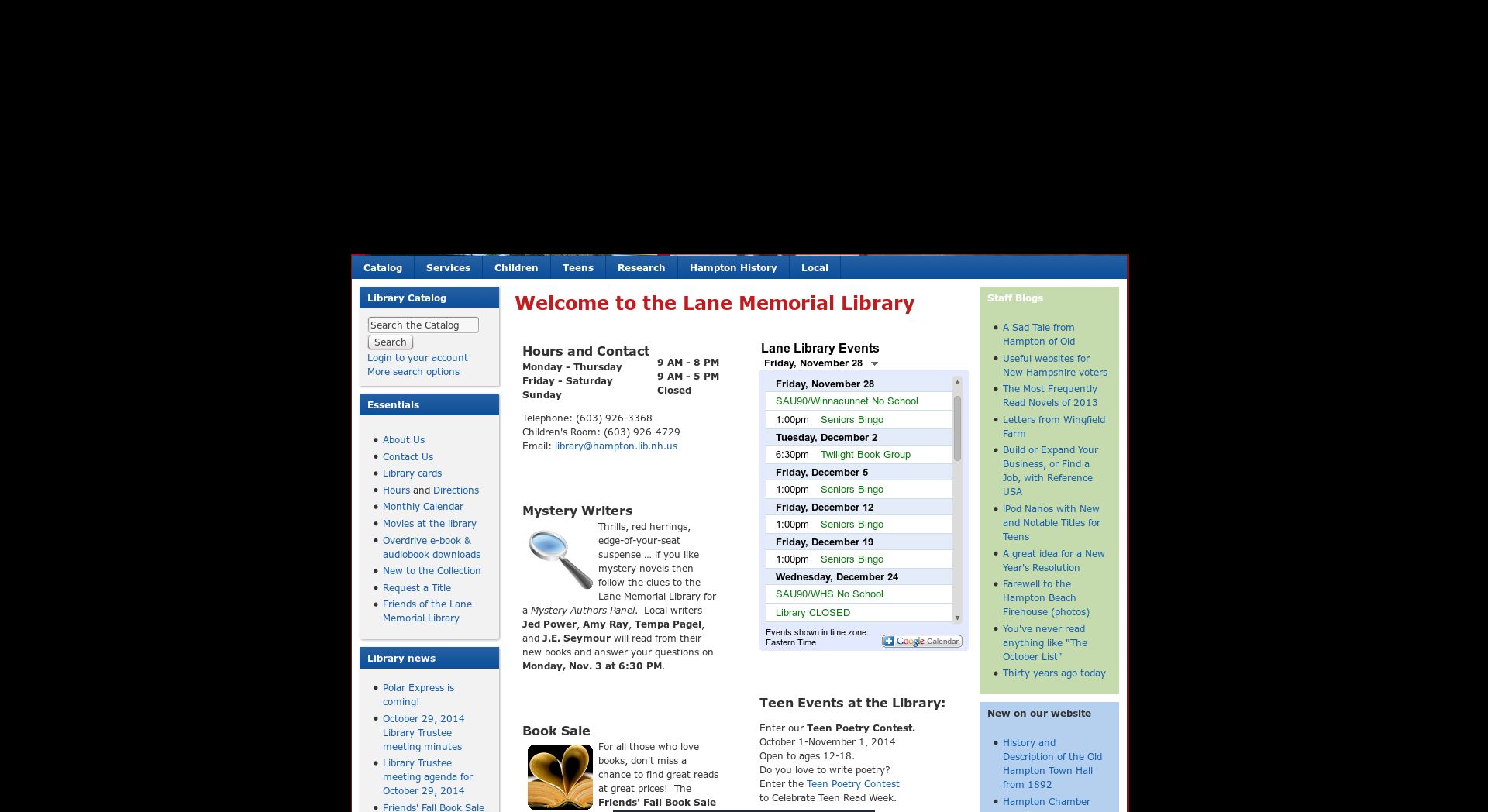
Honestly, that isn't at all bad. White space is very key in layout. You don't want things that close together, as it strains the readers eyes, especially in a time when we have multiple device screen resolutions. Here's a great article on it:
http://blog.teamtreehouse.com/white-space-in-web-design-what-it-is-and-why-y...
It's hard to tell from the screenshot, but most likely something adding to the space is bottom margins on paragraphs and top/bottom margins on headings. It's about impossible for a theme designer to know any and all combinations of visual elements that a user is going to incorporate in their site, especially given the flexibility of Drupal. For example, you might have paragraph tags have a 15 px bottom margin, but have lists use a 40px bottom margin. If a panel/block ends with a paragraph, it would have the 15px, but have the same panel/block end in a list and you get that 40px. That's why it's very common to add custom CSS into any site, just so you can tweak it right where you want it.
Having said all that, there are less than 3,000 installs of that theme for Drupal 7, so it's not really all that popular. Once you get past the biggies like Zen, Bootstrap, AdaptiveTheme and Omega, the popularity of themes really drops off quick. That's because many end up using one of those themes as a base then tweak everything else out to their likings in a sub-theme.
Jamie Holly http://hollyit.net
On 11/28/2014 2:23 PM, Darrell Eifert wrote:
Hello Jamie --
Thank you for the suggestions. I may eventually have to go that route, but I was thinking that if Panels worked fine "out of the box" on the D6 site, that I must be overlooking a simple setting in the D7 version that is resulting in the extra vertical spacing. I would be surprised if the programmers released such a popular module that came pre-configured / hard-coded to render a default page with such large vertical breaks ... (see attached screenshot).
Best,
Darrell Eifert Lane Memorial Library (603) 926-3368 On 11/28/2014 11:51 AM, Jamie Holly wrote:
You do not want to edit any files. Instead create a new theme that is a sub theme of the theme you are using and create a new CSS file in there, with the new rules you need.
https://www.drupal.org/node/225125
The other option is a custom module adding the new CSS file on hook_init, but going the subtheme is generally the best route.
From your home page, right click on the panel that is spaced wrong and select "inspect element" (Chrome and Firefox). That will show you the DOM tree and the style rules applied to it. You may have to work up the tree, but find the one giving the padding and/or margins that is causing the problem. Copy that style rule to your new CSS sheet and adjust the padding and/or margin to what you want.
This is a pure CSS fix that is one of the basic fundamentals of building any site (Drupal or not). It won't affect the staff's ability to create announcements, as the fixes would be universal throughout the site. Jamie Holly http://hollyit.net On 11/28/2014 11:29 AM, Darrell Eifert wrote:
Hello Tony --
Not sure ... we've pretty much used themes and modules "out of the box" in creating the D6 site and they've worked remarkably well. Our staff is trained to use the Panels UI and creates announcement 'snippets' on a regular basis to update the main page. If I could keep this functionality that would be fine -- what kind of css modification were you thinking of, and to what files?
-- Darrell
On 11/28/2014 10:55 AM, Tony wrote:
Would it not be easier to do it with css?
On Nov 28, 2014 7:49 AM, "Darrell Eifert" <deifert@hampton.lib.nh.us mailto:deifert@hampton.lib.nh.us> wrote:
Hello --

We just upgraded a copy of our Drupal 6 site using the Zen /
CTI-Flex
theme to Drupal 7 using an AtaptiveTheme base with the Mix and
Match
theme.  Everything went smoothly, except for how Panels
behaves in the
new D7 theme.  We have a simple two-column center panel
between two side
columns (see http://www.hampton.lib.nh.us for the current D6
production
site), and the D7 version of Panels creates an unacceptably
huge amount
of vertical white space between the panels.  If I change each
individual
panel to "no markup", the vertical panel space shrinks, but I
also lose
the side and center margins of the two columns, which I would
like to keep.

Before I start trying to change the Panels module code, does
anyone have
a simple suggesting for reducing the vertical space between
panels in a
column?

Thanks in advance ...

Darrell Eifert
Lane Memorial Library
--
[ Drupal support list | http://lists.drupal.org/ ]
Ah ha - paragraph and heading space. That might be part of the solution, given that they might be set differently in the Adaptive sub-theme vs. the old CTI-Flex. And you are correct about white space. I tried to pay attention to that in the D6 site (http://www.hampton.lib.nh.us), but the D7 conversion added just a wee bit too much for my taste. Given that we are a library site, we also need to pack in as much information "above the fold" as possible without straining the eyes. Thanks again for the response.
Best,
Darrell Eifert Lane Memorial Library (603) 926-3368
On 11/28/2014 3:04 PM, Jamie Holly wrote:
Honestly, that isn't at all bad. White space is very key in layout. You don't want things that close together, as it strains the readers eyes, especially in a time when we have multiple device screen resolutions. Here's a great article on it:
http://blog.teamtreehouse.com/white-space-in-web-design-what-it-is-and-why-y...
It's hard to tell from the screenshot, but most likely something adding to the space is bottom margins on paragraphs and top/bottom margins on headings. It's about impossible for a theme designer to know any and all combinations of visual elements that a user is going to incorporate in their site, especially given the flexibility of Drupal. For example, you might have paragraph tags have a 15 px bottom margin, but have lists use a 40px bottom margin. If a panel/block ends with a paragraph, it would have the 15px, but have the same panel/block end in a list and you get that 40px. That's why it's very common to add custom CSS into any site, just so you can tweak it right where you want it.
Having said all that, there are less than 3,000 installs of that theme for Drupal 7, so it's not really all that popular. Once you get past the biggies like Zen, Bootstrap, AdaptiveTheme and Omega, the popularity of themes really drops off quick. That's because many end up using one of those themes as a base then tweak everything else out to their likings in a sub-theme.
Jamie Holly http://hollyit.net On 11/28/2014 2:23 PM, Darrell Eifert wrote:
Hello Jamie --
Thank you for the suggestions. I may eventually have to go that route, but I was thinking that if Panels worked fine "out of the box" on the D6 site, that I must be overlooking a simple setting in the D7 version that is resulting in the extra vertical spacing. I would be surprised if the programmers released such a popular module that came pre-configured / hard-coded to render a default page with such large vertical breaks ... (see attached screenshot).
Best,
Darrell Eifert Lane Memorial Library (603) 926-3368 On 11/28/2014 11:51 AM, Jamie Holly wrote:
You do not want to edit any files. Instead create a new theme that is a sub theme of the theme you are using and create a new CSS file in there, with the new rules you need.
https://www.drupal.org/node/225125
The other option is a custom module adding the new CSS file on hook_init, but going the subtheme is generally the best route.
From your home page, right click on the panel that is spaced wrong and select "inspect element" (Chrome and Firefox). That will show you the DOM tree and the style rules applied to it. You may have to work up the tree, but find the one giving the padding and/or margins that is causing the problem. Copy that style rule to your new CSS sheet and adjust the padding and/or margin to what you want.
This is a pure CSS fix that is one of the basic fundamentals of building any site (Drupal or not). It won't affect the staff's ability to create announcements, as the fixes would be universal throughout the site. Jamie Holly http://hollyit.net On 11/28/2014 11:29 AM, Darrell Eifert wrote:
Hello Tony --
Not sure ... we've pretty much used themes and modules "out of the box" in creating the D6 site and they've worked remarkably well. Our staff is trained to use the Panels UI and creates announcement 'snippets' on a regular basis to update the main page. If I could keep this functionality that would be fine -- what kind of css modification were you thinking of, and to what files?
-- Darrell
On 11/28/2014 10:55 AM, Tony wrote:
Would it not be easier to do it with css?
On Nov 28, 2014 7:49 AM, "Darrell Eifert" <deifert@hampton.lib.nh.us mailto:deifert@hampton.lib.nh.us> wrote:
Hello --

We just upgraded a copy of our Drupal 6 site using the Zen /
CTI-Flex
theme to Drupal 7 using an AtaptiveTheme base with the Mix
and Match
theme.  Everything went smoothly, except for how Panels
behaves in the
new D7 theme.  We have a simple two-column center panel
between two side
columns (see http://www.hampton.lib.nh.us for the current D6
production
site), and the D7 version of Panels creates an unacceptably
huge amount
of vertical white space between the panels.  If I change each
individual
panel to "no markup", the vertical panel space shrinks, but I
also lose
the side and center margins of the two columns, which I would
like to keep.

Before I start trying to change the Panels module code, does
anyone have
a simple suggesting for reducing the vertical space between
panels in a
column?

Thanks in advance ...

Darrell Eifert
Lane Memorial Library
--
[ Drupal support list | http://lists.drupal.org/ ]
Doing a quick look through the CSS for that theme, it doesn't alter any of the top or bottom margins for panels, so it's most likely coming from either AdaptiveTheme or panels itself.
You can add additional CSS rules in the pages interface (the General tab). Of course if you're using multiple pages, you'll have to do this for each one. For testing purposes, you could just directly edit the CSS in the Mix and Match theme (make sure you have CSS aggregation switched off in the performance settings), then once you get everything how you like, take those changes and put into a custom, child theme. The other option, which is very much discouraged, is to either create a patch or some notes for the changes you made to the theme's CSS so that you can put them back in anytime you update it.
Another option for testing is Live CSS editor for Chrome:
https://chrome.google.com/webstore/detail/live-css-editor/oelggcmknbjmhkpgjf...
It gives you a little text box where you can put new rules in and see the changes instantly. After that, copy them to your child-theme's style.css file and you're good to go. Once you get past all the little Drupal "gotchas", like having to clear the cache when you change the .info file or having aggregation turned on, it can be done very quickly. For the change you want, it would become about a 10 minute project and one that won't break on updates. Not only that, but you also now got a stylesheet you control for any additional changes you might want in the future. I never build a site without some access to being able to insert custom CSS (child theme or through a custom module). It's one of the most common processes out there.
Jamie Holly http://hollyit.net
On 11/28/2014 3:21 PM, Darrell Eifert wrote:
Ah ha - paragraph and heading space. That might be part of the solution, given that they might be set differently in the Adaptive sub-theme vs. the old CTI-Flex. And you are correct about white space. I tried to pay attention to that in the D6 site (http://www.hampton.lib.nh.us), but the D7 conversion added just a wee bit too much for my taste. Given that we are a library site, we also need to pack in as much information "above the fold" as possible without straining the eyes. Thanks again for the response. Best,
Darrell Eifert Lane Memorial Library (603) 926-3368 On 11/28/2014 3:04 PM, Jamie Holly wrote:
Honestly, that isn't at all bad. White space is very key in layout. You don't want things that close together, as it strains the readers eyes, especially in a time when we have multiple device screen resolutions. Here's a great article on it:
http://blog.teamtreehouse.com/white-space-in-web-design-what-it-is-and-why-y...
It's hard to tell from the screenshot, but most likely something adding to the space is bottom margins on paragraphs and top/bottom margins on headings. It's about impossible for a theme designer to know any and all combinations of visual elements that a user is going to incorporate in their site, especially given the flexibility of Drupal. For example, you might have paragraph tags have a 15 px bottom margin, but have lists use a 40px bottom margin. If a panel/block ends with a paragraph, it would have the 15px, but have the same panel/block end in a list and you get that 40px. That's why it's very common to add custom CSS into any site, just so you can tweak it right where you want it.
Having said all that, there are less than 3,000 installs of that theme for Drupal 7, so it's not really all that popular. Once you get past the biggies like Zen, Bootstrap, AdaptiveTheme and Omega, the popularity of themes really drops off quick. That's because many end up using one of those themes as a base then tweak everything else out to their likings in a sub-theme.
Jamie Holly http://hollyit.net On 11/28/2014 2:23 PM, Darrell Eifert wrote:
Hello Jamie --
Thank you for the suggestions. I may eventually have to go that route, but I was thinking that if Panels worked fine "out of the box" on the D6 site, that I must be overlooking a simple setting in the D7 version that is resulting in the extra vertical spacing. I would be surprised if the programmers released such a popular module that came pre-configured / hard-coded to render a default page with such large vertical breaks ... (see attached screenshot).
Best,
Darrell Eifert Lane Memorial Library (603) 926-3368 On 11/28/2014 11:51 AM, Jamie Holly wrote:
You do not want to edit any files. Instead create a new theme that is a sub theme of the theme you are using and create a new CSS file in there, with the new rules you need.
https://www.drupal.org/node/225125
The other option is a custom module adding the new CSS file on hook_init, but going the subtheme is generally the best route.
From your home page, right click on the panel that is spaced wrong and select "inspect element" (Chrome and Firefox). That will show you the DOM tree and the style rules applied to it. You may have to work up the tree, but find the one giving the padding and/or margins that is causing the problem. Copy that style rule to your new CSS sheet and adjust the padding and/or margin to what you want.
This is a pure CSS fix that is one of the basic fundamentals of building any site (Drupal or not). It won't affect the staff's ability to create announcements, as the fixes would be universal throughout the site. Jamie Holly http://hollyit.net On 11/28/2014 11:29 AM, Darrell Eifert wrote:
Hello Tony --
Not sure ... we've pretty much used themes and modules "out of the box" in creating the D6 site and they've worked remarkably well. Our staff is trained to use the Panels UI and creates announcement 'snippets' on a regular basis to update the main page. If I could keep this functionality that would be fine -- what kind of css modification were you thinking of, and to what files?
-- Darrell
On 11/28/2014 10:55 AM, Tony wrote:
Would it not be easier to do it with css?
On Nov 28, 2014 7:49 AM, "Darrell Eifert" <deifert@hampton.lib.nh.us mailto:deifert@hampton.lib.nh.us> wrote:
Hello -- We just upgraded a copy of our Drupal 6 site using the Zen / CTI-Flex theme to Drupal 7 using an AtaptiveTheme base with the Mix and Match theme. Everything went smoothly, except for how Panels behaves in the new D7 theme. We have a simple two-column center panel between two side columns (see http://www.hampton.lib.nh.us for the current D6 production site), and the D7 version of Panels creates an unacceptably huge amount of vertical white space between the panels. If I change each individual panel to "no markup", the vertical panel space shrinks, but I also lose the side and center margins of the two columns, which I would like to keep. Before I start trying to change the Panels module code, does anyone have a simple suggesting for reducing the vertical space between panels in a column? Thanks in advance ... Darrell Eifert Lane Memorial Library -- [ Drupal support list | http://lists.drupal.org/ ]
-
 Darrell Eifert
 -
 Jamie Holly
 -
 Tony
Tony