
Hello,
Trying to give users in a certain role the ability to change the theme. Very basic 6.20 installation. Checked "select different theme" under the system module permissions for the particular role, but users with that role are not able to change the theme. Access administration pages is also set. What am I missing?
Regards, Leonard.

Obvious first question: Do you have multiple themes "enabled"? Users can only choose a theme has has been enabled.
--Larry Garfield
On Sunday, February 06, 2011 3:56:04 pm Leonard den Ottolander.nl wrote:
Hello,
Trying to give users in a certain role the ability to change the theme. Very basic 6.20 installation. Checked "select different theme" under the system module permissions for the particular role, but users with that role are not able to change the theme. Access administration pages is also set. What am I missing?
Regards, Leonard.

Users set their own theme on their account edit page, not on the theme administration page. Navigate to user/[uid]/edit and see if the option exists.
On Sun, Feb 6, 2011 at 4:27 PM, Leonard den Ottolander.nl < drupal@den.ottolander.nl> wrote:
On Sun, 2011-02-06 at 16:02 -0600, Larry Garfield wrote:
Obvious first question: Do you have multiple themes "enabled"? Users can
only
choose a theme has has been enabled.
Yes, of course :)
Regards, Leonard.
-- mount -t life -o ro /dev/dna /genetic/research
-- [ Drupal support list | http://lists.drupal.org/ ]
On Sun, 2011-02-06 at 17:02 -0700, Carl Wiedemann wrote:
Users set their own theme on their account edit page, not on the theme administration page.
I'm not trying to figure out how users can set their personal administration/login theme, I want a user with limited permissions to set the site wide theme. Enabling "select different theme" and "access administration pages" for the role permissions does not to seem to be sufficient to accomplish this. Which permissions do I need to set to make a user with a UID != 1 to be able to change the system wide theme?
Regards, Leonard.
I'm not sure if this has changed in Drupal 7, but in Drupal 6, users need the permission "administer site configuration" in order to access the path admin/build/themes.
On Sun, Feb 6, 2011 at 7:45 PM, Leonard den Ottolander.nl < drupal@den.ottolander.nl> wrote:
On Sun, 2011-02-06 at 17:02 -0700, Carl Wiedemann wrote:
Users set their own theme on their account edit page, not on the theme administration page.
I'm not trying to figure out how users can set their personal administration/login theme, I want a user with limited permissions to set the site wide theme. Enabling "select different theme" and "access administration pages" for the role permissions does not to seem to be sufficient to accomplish this. Which permissions do I need to set to make a user with a UID != 1 to be able to change the system wide theme?
Regards, Leonard.
-- mount -t life -o ro /dev/dna /genetic/research
-- [ Drupal support list | http://lists.drupal.org/ ]

On 2/6/11 10:59 PM, Carl Wiedemann wrote:
I'm not sure if this has changed in Drupal 7, but in Drupal 6, users need the permission "administer site configuration" in order to access the path admin/build/themes.
just tested. Very strange that one must be allowed to administer all sub-items of site configuration in order to change the theme which is under site building.
That one checkbox allows the role to do *everything* in site configuration, which is not what Leonard is looking for.
And then why is there a separate permission to "select different theme" under System Module in permissions? If I check the "administer site configuration" permission and /uncheck/ "select different theme" the user can still change & configure the site-wide theme.
"huh?@!"
kazar
On 2/7/11 9:21 AM, adept techlists - kazar wrote:
On 2/6/11 10:59 PM, Carl Wiedemann wrote:
I'm not sure if this has changed in Drupal 7, but in Drupal 6, users need the permission "administer site configuration" in order to access the path admin/build/themes.
just tested. Very strange that one must be allowed to administer all sub-items of site configuration in order to change the theme which is under site building.
That one checkbox allows the role to do *everything* in site configuration, which is not what Leonard is looking for.
And then why is there a separate permission to "select different theme" under System Module in permissions? If I check the "administer site configuration" permission and /uncheck/ "select different theme" the user can still change& configure the site-wide theme.
"huh?@!"
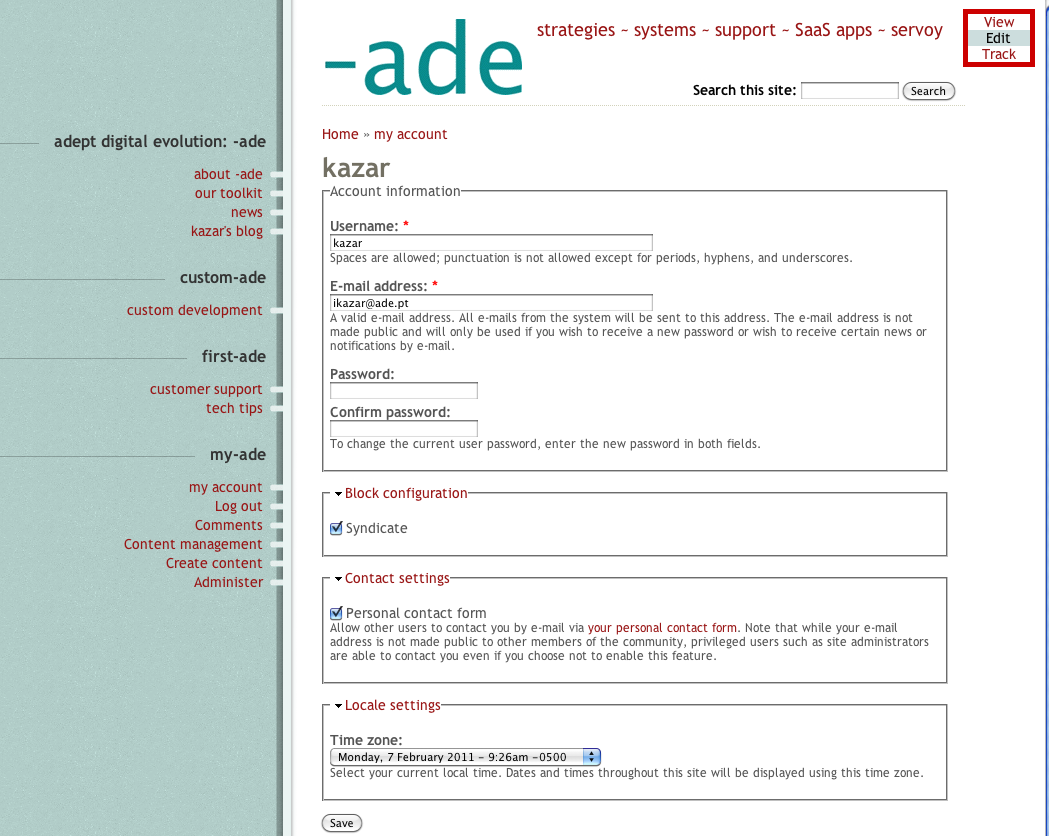
furthermore, it seems the option to allow a user to change the theme on the account level is now missing (i'm still on 6.19). see att'd screenshot of an account page (the theme is Abarre but i tested with other themes applied site-wide and there still is no button or link to change the theme on the user's account page)
kazar

First feel the need to make sure you understand how it is supposed to work:
The "select different theme" is suppose to control who has permissions to have a different theme than a site wide theme, that is a user specific theme. The themes that they are allowed to pick are controlled by which themes are enabled in admin/build/themes. If you only have one theme enabled, then the user will not see the choice regardless of permission.
The ability to change a site wide theme is in fact controlled by the "admister site configuration" theme. You may find it strange, but I guess there just haven't been enough use cases where you'd let someone change atheme, but not hte site slogan or title to justify the feature request.
Well looks like you figured it out while I was writing this. But hitting send anyway just ofr the record.
Dave
________________________________
From: support-bounces@drupal.org [mailto:support-bounces@drupal.org] On Behalf Of adept techlists - kazar Sent: Monday, February 07, 2011 6:28 AM To: support@drupal.org Subject: Re: [support] Select different theme
On 2/7/11 9:21 AM, adept techlists - kazar wrote:
On 2/6/11 10:59 PM, Carl Wiedemann wrote:
I'm not sure if this has changed in Drupal 7, but in Drupal 6, users need the permission "administer site configuration" in order to access the path admin/build/themes.
just tested. Very strange that one must be allowed to administer all sub-items of site configuration in order to change the theme which is under site building. That one checkbox allows the role to do *everything* in site configuration, which is not what Leonard is looking for. And then why is there a separate permission to "select different theme" under System Module in permissions? If I check the "administer site configuration" permission and /uncheck/ "select different theme" the user can still change & configure the site-wide theme. "huh?@!"
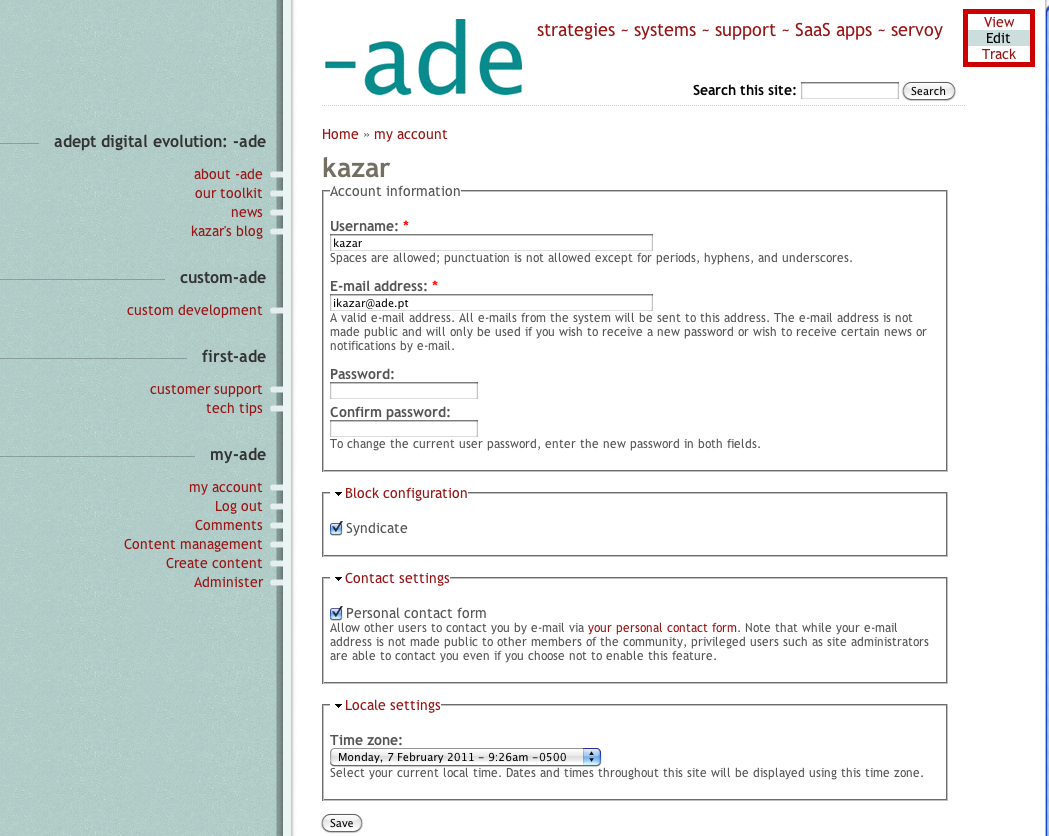
furthermore, it seems the option to allow a user to change the theme on the account level is now missing (i'm still on 6.19). see att'd screenshot of an account page (the theme is Abarre but i tested with other themes applied site-wide and there still is no button or link to change the theme on the user's account page)
kazar
Changing the site's theme is a non-trivial operation, especially since there is no guarantee that switched themes will have identical regions and block settings vary between themes.
For those familiar with hook_menu_alter(), this could probably be used to grant the access necessary from a custom module. Use with caution.
On Mon, Feb 7, 2011 at 9:14 AM, Metzler, David metzlerd@evergreen.eduwrote:
First feel the need to make sure you understand how it is supposed to work:
The "select different theme" is suppose to control who has permissions to have a different theme than a site wide theme, that is a user specific theme. The themes that they are allowed to pick are controlled by which themes are enabled in admin/build/themes. If you only have one theme enabled, then the user will not see the choice regardless of permission.
The ability to change a site wide theme is in fact controlled by the "admister site configuration" theme. You may find it strange, but I guess there just haven't been enough use cases where you'd let someone change atheme, but not hte site slogan or title to justify the feature request.
Well looks like you figured it out while I was writing this. But hitting send anyway just ofr the record.
Dave
*From:* support-bounces@drupal.org [mailto:support-bounces@drupal.org] *On Behalf Of *adept techlists - kazar *Sent:* Monday, February 07, 2011 6:28 AM *To:* support@drupal.org *Subject:* Re: [support] Select different theme
On 2/7/11 9:21 AM, adept techlists - kazar wrote:
On 2/6/11 10:59 PM, Carl Wiedemann wrote:
I'm not sure if this has changed in Drupal 7, but in Drupal 6, users need the permission "administer site configuration" in order to access the path admin/build/themes.
just tested. Very strange that one must be allowed to administer all sub-items of site configuration in order to change the theme which is under site building.
That one checkbox allows the role to do *everything* in site configuration, which is not what Leonard is looking for.
And then why is there a separate permission to "select different theme" under System Module in permissions? If I check the "administer site configuration" permission and /uncheck/ "select different theme" the user can still change & configure the site-wide theme.
"huh?@!"
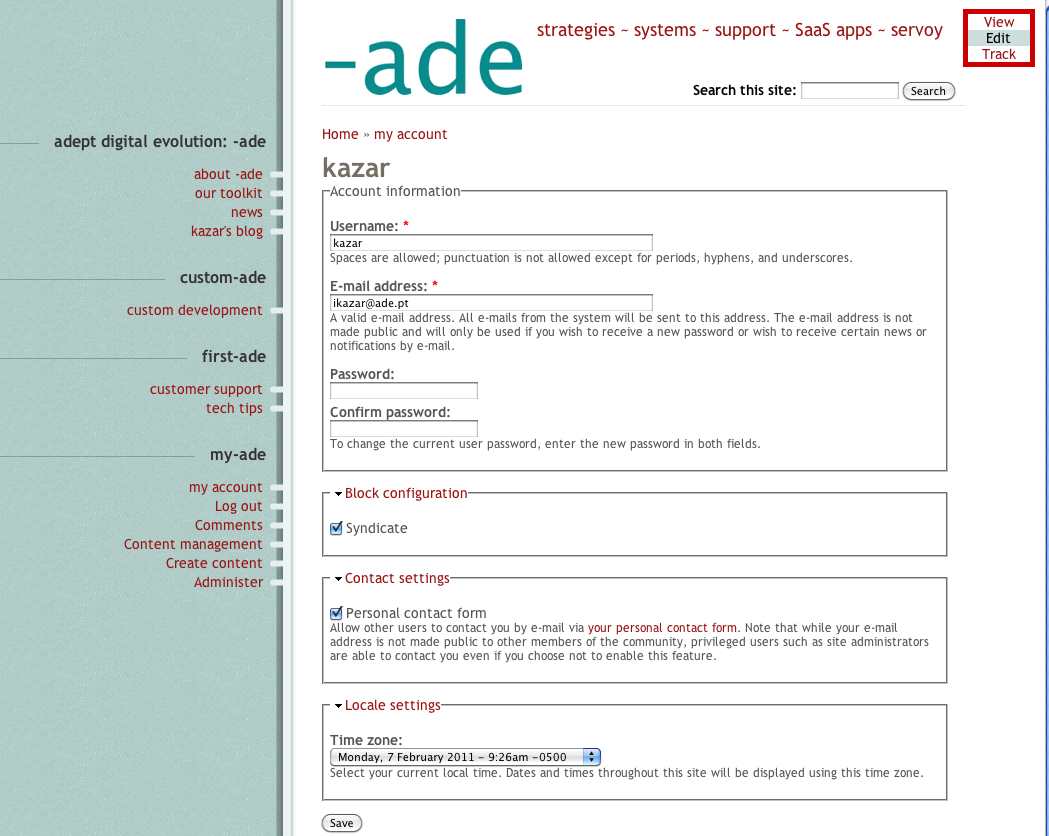
furthermore, it seems the option to allow a user to change the theme on the account level is now missing (i'm still on 6.19). see att'd screenshot of an account page (the theme is Abarre but i tested with other themes applied site-wide and there still is no button or link to change the theme on the user's account page)
kazar
-- [ Drupal support list | http://lists.drupal.org/ ]
Hello Carl,
On Sun, 2011-02-06 at 20:59 -0700, Carl Wiedemann wrote:
I'm not sure if this has changed in Drupal 7, but in Drupal 6, users need the permission "administer site configuration" in order to access the path admin/build/themes.
Ouch. I was afraid you would say that. "Administer site configuration" gives way too many permissions for my use case.
So "select different theme" actually means "select different user login theme" instead of "select different site theme" which I thought it meant. Since it only affects individual users it seems more appropriate to put that entry under the user module permissions not the system module permissions.
With a bit of searching I found the Site Configuration Permissions/Custom Permissions module which I think will solve my issue. Still I'm a bit surprised this kind of functionality is not in core.
Regards, Leonard.
On Mon, 2011-02-07 at 17:11 +0100, Leonard den Ottolander.nl wrote:
With a bit of searching I found the Site Configuration Permissions/Custom Permissions module which I think will solve my issue.
The module misses the "administer theme" option since the upgrade from 6.x-1.0 to 6.x-2.0. Just adding
(Sorry for that incomplete send.)
On Mon, 2011-02-07 at 17:11 +0100, Leonard den Ottolander.nl wrote:
With a bit of searching I found the Site Configuration Permissions/Custom Permissions module which I think will solve my issue.
The module misses the "administer theme" option since the upgrade from 6.x-1.0 to 6.x-2.0. Just adding
'administer themes' => array('admin/build/themes', 'admin/build/themes/settings'),
to the $perms array in config_perms.install seems to reenable this functionality.
Regards, Leonard.
I just checked and can confirm that allowing a user to administer site themes does not add the option to that user-level's UI.
Not only that, I can't even see where a user would change their own theme (yes, i have more than one enabled). On the account page there is no option for changing the theme.
Since the user option to change the theme (even for their own account) was removed in Drupal 7 (see http://drupal.org/node/292253), I wonder if this change was also applied to later versions of 6, and whether the change perhaps introduced a bug in the permissions module that does not allow a role to administer the site theme even when that permission is checked.
kazar
On 2/6/11 9:45 PM, Leonard den Ottolander.nl wrote:
On Sun, 2011-02-06 at 17:02 -0700, Carl Wiedemann wrote:
Users set their own theme on their account edit page, not on the theme administration page.
I'm not trying to figure out how users can set their personal administration/login theme, I want a user with limited permissions to set the site wide theme. Enabling "select different theme" and "access administration pages" for the role permissions does not to seem to be sufficient to accomplish this. Which permissions do I need to set to make a user with a UID != 1 to be able to change the system wide theme?
Regards, Leonard.

I just tried changing the mysql user password for a live site. Changed the user's pw using cpanel and then on the settings.php file. The site reported back that it was offline even after several refreshes. I changed the user pw and settings.php file back to the old values and the site's up and running.
What step did I miss here?
Thanks in advance. Marty

Hi,
Try one of the following: * Are you editing the right settings.php file (for that particular site) * make sure that you have access to write/edit/modify the settings.php file (chmod it 744 for while editing)-Drupal automatically changes back the perms to default on each page refresh. * check that you are using the right format for the databse variable in settings.php (no spaces for the password after colon) *are you typing th epassword correctly?
You may just want to rerun the install script and enter your database values throught the front end.
Hope this helps.
Kind regards, Ayath ULLAH
Date: Wed, 9 Feb 2011 18:03:01 -0500 To: support@drupal.org From: mlandman@face2interface.com Subject: [support] db password change
I just tried changing the mysql user password for a live site. Changed the user's pw using cpanel and then on the settings.php file. The site reported back that it was offline even after several refreshes. I changed the user pw and settings.php file back to the old values and the site's up and running.
What step did I miss here?
Thanks in advance. Marty
-- Open first 10 Google results in 10 new tabs https://addons.mozilla.org/af/firefox/addon/181910/
-- [ Drupal support list | http://lists.drupal.org/ ]
At 06:15 PM 2/9/2011, Ayath ULLAH wrote:
- make sure that you have access to write/edit/modify the
settings.php file (chmod it 744 for while editing)-Drupal automatically changes back the perms to default on each page refresh.
Ayath,
When first looking at it I thought the perms were wrong - 755 - and changed them to 644. Can you point me a discussion explaining the ins and outs of this? This is a live site, new to me, and I am treading lightly at this point. FWIW site seems to be running fine now with the settings.php file at 644.
Thanks. Marty
Hi,
I've found this from the officail docs and there are some discussuins underneath the article.
http://drupal.org/documentation/install/settings-file
Kind regards, Ayath
Date: Wed, 9 Feb 2011 18:40:30 -0500 To: support@drupal.org From: mlandman@face2interface.com Subject: Re: [support] db password change
At 06:15 PM 2/9/2011, Ayath ULLAH wrote:
- make sure that you have access to write/edit/modify the
settings.php file (chmod it 744 for while editing)-Drupal automatically changes back the perms to default on each page refresh.
Ayath,
When first looking at it I thought the perms were wrong - 755 - and changed them to 644. Can you point me a discussion explaining the ins and outs of this? This is a live site, new to me, and I am treading lightly at this point. FWIW site seems to be running fine now with the settings.php file at 644.
Thanks. Marty
-- [ Drupal support list | http://lists.drupal.org/ ]

For the record 644 is a better mode for settings.php than 755. You don't want someone trying to execute the file as a script. When creating a new site all you need to do in the sites/mysite directory is create an empty settings.php file (cd sites/mysite && touch settings.php). The default.settings.php file in the sites/default directory is for Drupal to use for default values and to validate a correct structure.
HTH, Earnie
Ayath ULLAH wrote:
Hi,
I've found this from the officail docs and there are some discussuins underneath the article.
http://drupal.org/documentation/install/settings-file
Kind regards, Ayath
Date: Wed, 9 Feb 2011 18:40:30 -0500 To: support@drupal.org From: mlandman@face2interface.com Subject: Re: [support] db password change
At 06:15 PM 2/9/2011, Ayath ULLAH wrote:
- make sure that you have access to write/edit/modify the
settings.php file (chmod it 744 for while editing)-Drupal automatically changes back the perms to default on each page refresh.
Ayath,
When first looking at it I thought the perms were wrong - 755 - and changed them to 644. Can you point me a discussion explaining the ins and outs of this? This is a live site, new to me, and I am treading lightly at this point. FWIW site seems to be running fine now with the settings.php file at 644.
Thanks. Marty
-- [ Drupal support list | http://lists.drupal.org/ ]

Your cpanel may not be doing a flush privileges in mysql
-Don-
On 2/9/2011 6:03 PM, Marty Landman wrote:
I just tried changing the mysql user password for a live site. Changed the user's pw using cpanel and then on the settings.php file. The site reported back that it was offline even after several refreshes. I changed the user pw and settings.php file back to the old values and the site's up and running.
What step did I miss here?
Thanks in advance. Marty
-
 adept techlists - kazar
 -
 Ayath ULLAH
 -
 Carl Wiedemann
 -
 Don
Don -
 Earnie Boyd
 -
 Larry Garfield
 -
 Leonard den Ottolander.nl
 -
 Marty Landman
 -
 Metzler, David