
I'm using drupal 5.1. I've installed img_assist and tinymce and enabled the drupalimage plugin in tinymce and fixed the path problem using these instructions http://drupal.org/node/135692. I am now able to insert images into tinymce; however, the image appears "broken" in the tinymce but correct in the Preview area. What am I doing wrong?
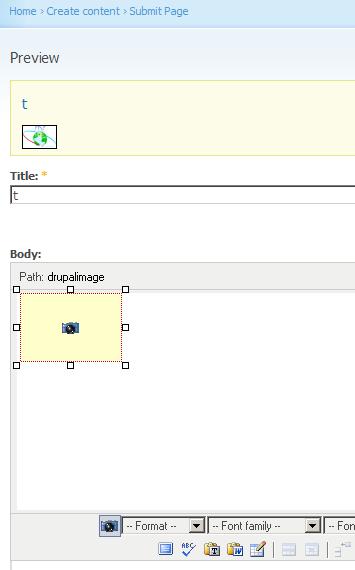
Has someone experience this and solved it?
Haisam K. Ido wrote:
I'm using drupal 5.1. I've installed img_assist and tinymce and enabled the drupalimage plugin in tinymce and fixed the path problem using these instructions http://drupal.org/node/135692. I am now able to insert images into tinymce; however, the image appears "broken" in the tinymce but correct in the Preview area. What am I doing wrong?

9 times out of 10 this is related to the image assist config. Image assist may be configured to use the filter rather than html inserts. It's cool but TinyMCE can't display the images in this case.
Any chance this is your problem?
Dave
-----Original Message----- From: support-bounces@drupal.org [mailto:support-bounces@drupal.org] On Behalf Of Haisam K. Ido Sent: Thursday, April 19, 2007 2:02 PM To: support@drupal.org Subject: Re: [support] 5.1 img_assist, drupalimage and tinymce
Has someone experience this and solved it?
Haisam K. Ido wrote:
I'm using drupal 5.1. I've installed img_assist and tinymce and enabled the drupalimage plugin in tinymce and fixed the path problem using these instructions http://drupal.org/node/135692. I am now able
to insert images into tinymce; however, the image appears "broken" in the tinymce but correct in the Preview area. What am I doing wrong?
-- [ Drupal support list | http://lists.drupal.org/ ]
It could certainly be my problem :-) Can you elaborate on what you mean by:
/Image assist may be configured to use the filter rather than html
inserts/
However, I had no problems with 4.7.6 straight out of the "box"
Metzler, David wrote:
9 times out of 10 this is related to the image assist config. Image assist may be configured to use the filter rather than html inserts. It's cool but TinyMCE can't display the images in this case.
Any chance this is your problem?
Dave
-----Original Message----- From: support-bounces@drupal.org [mailto:support-bounces@drupal.org] On Behalf Of Haisam K. Ido Sent: Thursday, April 19, 2007 2:02 PM To: support@drupal.org Subject: Re: [support] 5.1 img_assist, drupalimage and tinymce
Has someone experience this and solved it?
Haisam K. Ido wrote:
I'm using drupal 5.1. I've installed img_assist and tinymce and enabled the drupalimage plugin in tinymce and fixed the path problem using these instructions http://drupal.org/node/135692. I am now able
to insert images into tinymce; however, the image appears "broken" in the tinymce but correct in the Preview area. What am I doing wrong?
-- [ Drupal support list | http://lists.drupal.org/ ]
Navigate to admin/settings/img_assist
Check in the "Other Properties" fieldset on that page. There's a setting called "Default insert mode" which can be set to HTML Code or Filter Tag.
Dave
________________________________
From: support-bounces@drupal.org [mailto:support-bounces@drupal.org] On Behalf Of Haisam K. Ido Sent: Friday, April 20, 2007 1:37 PM To: support@drupal.org Subject: Re: [support] 5.1 img_assist, drupalimage and tinymce
It could certainly be my problem :-) Can you elaborate on what you mean by:
Image assist may be configured to use the filter rather than html inserts
However, I had no problems with 4.7.6 straight out of the "box"
Metzler, David wrote:
9 times out of 10 this is related to the image assist config. Image assist may be configured to use the filter rather than html inserts. It's cool but TinyMCE can't display the images in this case. Any chance this is your problem? Dave -----Original Message----- From: support-bounces@drupal.org [mailto:support-bounces@drupal.org] On Behalf Of Haisam K. Ido Sent: Thursday, April 19, 2007 2:02 PM To: support@drupal.org Subject: Re: [support] 5.1 img_assist, drupalimage and tinymce Has someone experience this and solved it? Haisam K. Ido wrote:
I'm using drupal 5.1. I've installed img_assist and tinymce and enabled the drupalimage plugin in tinymce and fixed the path problem using these instructions http://drupal.org/node/135692. I am now able
to insert images into tinymce; however, the image appears "broken" in the tinymce but correct in the Preview area. What am I doing wrong?
-- [ Drupal support list | http://lists.drupal.org/ ]
Ah, but that would break the best feature of img_assist, i.e. its insertion of tags instead of a hard-coded path. This used to work with 4.7.6! I have a suspicion that it's a path problem with tinymce.
Metzler, David wrote:
Navigate to admin/settings/img_assist
Check in the "Other Properties" fieldset on that page. There's a setting called "Default insert mode" which can be set to HTML Code or Filter Tag.
Dave
*From:* support-bounces@drupal.org [mailto:support-bounces@drupal.org] *On Behalf Of *Haisam K. Ido *Sent:* Friday, April 20, 2007 1:37 PM *To:* support@drupal.org *Subject:* Re: [support] 5.1 img_assist, drupalimage and tinymce
It could certainly be my problem :-) Can you elaborate on what you mean by:
/Image assist may be configured to use the filter rather than html inserts/However, I had no problems with 4.7.6 straight out of the "box"
Metzler, David wrote:
9 times out of 10 this is related to the image assist config. Image assist may be configured to use the filter rather than html inserts. It's cool but TinyMCE can't display the images in this case.
Any chance this is your problem?
Dave
-----Original Message----- From: support-bounces@drupal.org [mailto:support-bounces@drupal.org] On Behalf Of Haisam K. Ido Sent: Thursday, April 19, 2007 2:02 PM To: support@drupal.org Subject: Re: [support] 5.1 img_assist, drupalimage and tinymce
Has someone experience this and solved it?
Haisam K. Ido wrote:
I'm using drupal 5.1. I've installed img_assist and tinymce and enabled the drupalimage plugin in tinymce and fixed the path problem using these instructions http://drupal.org/node/135692. I am now able
to insert images into tinymce; however, the image appears "broken" in the tinymce but correct in the Preview area. What am I doing wrong?
-- [ Drupal support list | http://lists.drupal.org/ ]
-
 Haisam K. Ido
 -
 Metzler, David