
Hi Guys and Girls,
can anyone recommend a good general discussion site or place where I can read about Drupal caching. Currently running Memcache and APC - the PHP accelerator, but not sure whether there would be anything to gain by implementing Drupals caching as well. Wouldn't mind finding some way of measuring the effects of the various performance enhancements. Are there any downsides to Memcache and APC?
Hugs
Alison

The high performance group on drupal.org is really good:
https://groups.drupal.org/high-performance
The most common recipe is APC for opcode caching, memcache for object caching and Drupal's database to cache the form table.
APC also offers object/user caching, but you do have to spend sometime getting it tuned right so the memory does fragment. In one high performance site I manage I use the same recipe as above, but I use APC to handle page caching.
Of course all this varies greatly by site. Some sites are mostly anonymous users, meaning page caching is the key, while others have a heavy logged-in user base, so object caching becomes the big factor.
Also depending on how the site is built, there's other cache modules out there that really help, like views cache, authcache and panels cache.
Jamie Holly http://hollyit.net
On 1/3/2014 5:08 AM, Alison wrote:
Hi Guys and Girls,
can anyone recommend a good general discussion site or place where I can read about Drupal caching. Currently running Memcache and APC - the PHP accelerator, but not sure whether there would be anything to gain by implementing Drupals caching as well. Wouldn't mind finding some way of measuring the effects of the various performance enhancements. Are there any downsides to Memcache and APC?
Hugs
Alison

Hi Alison, Please share what you find. I have been intending to look into this myself. I'm concerned about the initial page load time on my site. It seems pretty slow. Regards, Phil
From: Jamie Holly hovercrafter@earthlink.net To: support@drupal.org, Date: 01/03/2014 09:31 AM Subject: Re: [support] Improving performance Sent by: support-bounces@drupal.org
The high performance group on drupal.org is really good:
https://groups.drupal.org/high-performance
The most common recipe is APC for opcode caching, memcache for object caching and Drupal's database to cache the form table.
APC also offers object/user caching, but you do have to spend sometime getting it tuned right so the memory does fragment. In one high performance site I manage I use the same recipe as above, but I use APC to handle page caching.
Of course all this varies greatly by site. Some sites are mostly anonymous users, meaning page caching is the key, while others have a heavy logged-in user base, so object caching becomes the big factor.
Also depending on how the site is built, there's other cache modules out there that really help, like views cache, authcache and panels cache.
Jamie Holly http://hollyit.net
On 1/3/2014 5:08 AM, Alison wrote:
Hi Guys and Girls,
can anyone recommend a good general discussion site or place where I can
read about Drupal caching. Currently running Memcache and APC - the PHP accelerator, but not sure whether there would be anything to gain by implementing Drupals caching as well. Wouldn't mind finding some way of measuring the effects of the various performance enhancements. Are there any downsides to Memcache and APC?
Hugs
Alison
-- [ Drupal support list | http://lists.drupal.org/ ]
Hi all,
My client wants to have no landing page if the user clicks on any of the top level menu links. Specifying <front> for the path works perfectly, except the color of the menu becomes the "selected" color (same as mouse over).
I still want it to change color when the user mouses over it.
Is there a way to fix that? I was thinking of creating a view that is completely transparent, but I'm not sure how to do that if possible.
Thanks, Phil
The color of links are all done in CSS. Using your browsers developer tools, inspect that element and see where it's getting the color from. Most likely it's from a :active or .active CSS rule.
The base Drupal menu rendering function does add class names to each item, based on their menu item id, so you can add a rule to just target that menu item (ie: menu-230 or whatever the ID is). That depends in a large part on your theme.
Basically this is just simple CSS/themeing. Not really sure what you mean by a "transparent view". You may be able to do something in views to change this, just like a surgeon could use a chainsaw to make an incision. It could work, but absolutely the wrong tool/technology for the job.
Jamie Holly http://hollyit.net
On 1/3/2014 11:32 AM, Philip_Wetzel@nhd.uscourts.gov wrote:
Hi all,
My client wants to have no landing page if the user clicks on any of the top level menu links. Specifying <front> for the path works perfectly, except the color of the menu becomes the "selected" color (same as mouse over).
I still want it to change color when the user mouses over it.
Is there a way to fix that? I was thinking of creating a view that is completely transparent, but I'm not sure how to do that if possible.
Thanks, Phil

This is a long-running issue in Drupal, with no perfect solution. Using <front> may work for you, but I doubt it. There are some modules that address this (I'll leave the search to you). What I did in the past was to put a small text on a page that says "Here's what you can find in this section" and then include a menu block for the sub-menu of the main item.
Nancy
From: "Philip_Wetzel@nhd.uscourts.gov" My client wants to have no landing page if the user clicks on any of the top level menu links. Specifying <front> for the path works perfectly, except the color of the menu becomes the "selected" color (same as mouse over).
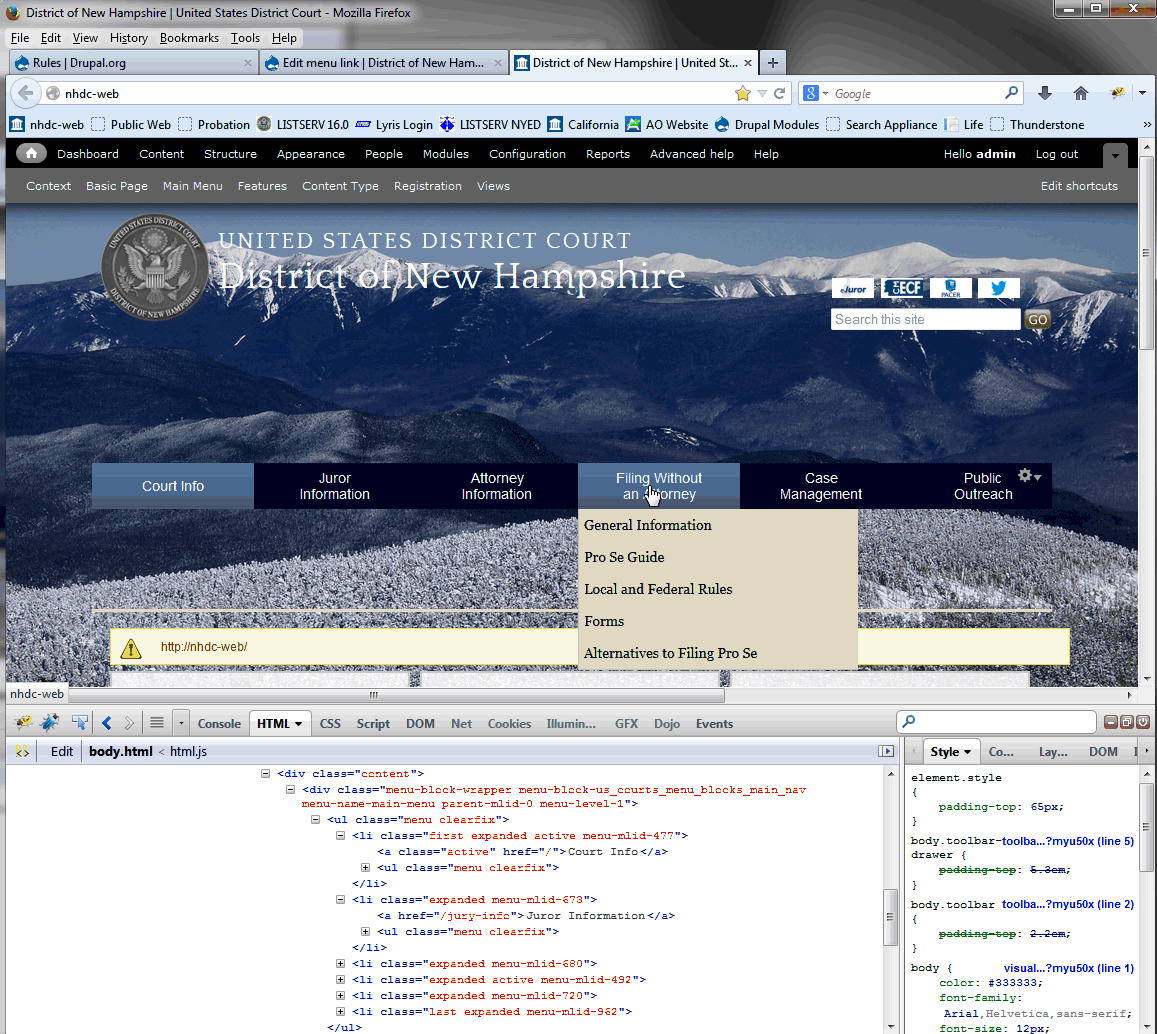
Hmm, I'm not giving up on the idea of creating a rule just yet. I created a rule to throw up a warning on page init (something like that). So, I have the "when" to do it figured out. You can see that the "Court Info" "a" tag has the "active" class assigned to it. Looks like I just need to get rid of the class assignment (make it class=""). so it looks like the Jury-info <a href one below it.
I can make the active color same as the non-active color, but then I would loose the mouse over color change. I know my client would not like that at the least.
Nancy, by menu block you mean what I'm showing under "filing without an Attorney"? Thanks all! Phil PS:Hope the screenshot comes out OK. I'm a Lotus notes rookie.
(Embedded image moved to file: pic29358.gif)
From: Nancy Wichmann nan_wich@bellsouth.net To: "support@drupal.org" support@drupal.org, Date: 01/03/2014 12:56 PM Subject: Re: [support] Using <front> for Path in a menu link Sent by: support-bounces@drupal.org
This is a long-running issue in Drupal, with no perfect solution. Using <front> may work for you, but I doubt it. There are some modules that address this (I'll leave the search to you). What I did in the past was to put a small text on a page that says "Here's what you can find in this section" and then include a menu block for the sub-menu of the main item.
Nancy
From: "Philip_Wetzel@nhd.uscourts.gov" My client wants to have no landing page if the user clicks on any of the top level menu links. Specifying <front> for the path works perfectly, except the color of the menu becomes the "selected" color (same as mouse over).-- [ Drupal support list | http://lists.drupal.org/ ]
If you do the rules right, you won't loose the mouseover. Say you're selecting based on the a element having the active class:
a.active { // This will become your active color. Set it to the same as the regular color a color if you don't want a different color. color:
}
a.active:hover { // Your hover color. To keep it the same as hover, set it to what the other hovers are. color: }
You've also got the :active selector the browser uses, as well as :visited. Those colors depend upon the browser, unless specified in the stylesheet, which is why it's a good idea to reset them in your theme.
Jamie Holly http://hollyit.net
On 1/3/2014 1:37 PM, Philip_Wetzel@nhd.uscourts.gov wrote:
Hmm, I'm not giving up on the idea of creating a rule just yet. I created a rule to throw up a warning on page init (something like that). So, I have the "when" to do it figured out. You can see that the "Court Info" "a" tag has the "active" class assigned to it. Looks like I just need to get rid of the class assignment (make it class=""). so it looks like the Jury-info <a href one below it.
I can make the active color same as the non-active color, but then I would loose the mouse over color change. I know my client would not like that at the least.
Nancy, by menu block you mean what I'm showing under "filing without an Attorney"? Thanks all! Phil PS:Hope the screenshot comes out OK. I'm a Lotus notes rookie.
(Embedded image moved to file: pic29358.gif)
From: Nancy Wichmann nan_wich@bellsouth.net To: "support@drupal.org" support@drupal.org, Date: 01/03/2014 12:56 PM Subject: Re: [support] Using <front> for Path in a menu link Sent by: support-bounces@drupal.org
This is a long-running issue in Drupal, with no perfect solution. Using <front> may work for you, but I doubt it. There are some modules that address this (I'll leave the search to you). What I did in the past was to put a small text on a page that says "Here's what you can find in this section" and then include a menu block for the sub-menu of the main item.
Nancy
From: "Philip_Wetzel@nhd.uscourts.gov" My client wants to have no landing page if the user clicks on any of the top level menu links. Specifying <front> for the path works perfectly, except the color of the menu becomes the "selected" color (same as mouse over).-- [ Drupal support list | http://lists.drupal.org/ ]
Hmmm, turns out it was a mistake I had made in the css a while back. Working fine now. I was kinda looking forward to use it to learn how to use rules. You were talking about creating a rule using the rules module, right? Or did you just mean adding stuff to the CSS?
Have a great weekend everyone, Phil
From: Jamie Holly hovercrafter@earthlink.net To: support@drupal.org, Date: 01/03/2014 02:15 PM Subject: Re: [support] Using <front> for Path in a menu link Sent by: support-bounces@drupal.org
If you do the rules right, you won't loose the mouseover. Say you're selecting based on the a element having the active class:
a.active { // This will become your active color. Set it to the same as the regular color a color if you don't want a different color. color:
}
a.active:hover { // Your hover color. To keep it the same as hover, set it to what the other hovers are. color: }
You've also got the :active selector the browser uses, as well as :visited. Those colors depend upon the browser, unless specified in the stylesheet, which is why it's a good idea to reset them in your theme.
Jamie Holly http://hollyit.net On 1/3/2014 1:37 PM, Philip_Wetzel@nhd.uscourts.gov wrote: Hmm, I'm not giving up on the idea of creating a rule just yet. I created a rule to throw up a warning on page init (something like that). So, I have the "when" to do it figured out. You can see that the "Court Info" "a" tag has the "active" class assigned to it. Looks like I just need to get rid of the class assignment (make it class=""). so it looks like the Jury-info <a href one below it.
I can make the active color same as the non-active color, but then I would loose the mouse over color change. I know my client would not like that at the least.
Nancy, by menu block you mean what I'm showing under "filing without an Attorney"? Thanks all! Phil PS:Hope the screenshot comes out OK. I'm a Lotus notes rookie.
(Embedded image moved to file: pic29358.gif)
From: Nancy Wichmann nan_wich@bellsouth.net To: "support@drupal.org" support@drupal.org, Date: 01/03/2014 12:56 PM Subject: Re: [support] Using <front> for Path in a menu link Sent by: support-bounces@drupal.org
This is a long-running issue in Drupal, with no perfect solution. Using <front> may work for you, but I doubt it. There are some modules that address this (I'll leave the search to you). What I did in the past was to put a small text on a page that says "Here's what you can find in this section" and then include a menu block for the sub-menu of the main item.
Nancy
From: "Philip_Wetzel@nhd.uscourts.gov" My client wants to have no landing page if the user clicks on any of the top level menu links. Specifying <front> for the path works perfectly, except the color of the menu becomes the "selected" color (same as mouse over).-- [ Drupal support list | http://lists.drupal.org/ ]
-- [ Drupal support list | http://lists.drupal.org/ ]
Just using CSS. Why sit there and waste very valuable server resources to do something server side, when it is so easily handled in client side via things like CSS? The only time things like changing colors on elements should require anything server side is when the underlying CSS doesn't have the necessary selectors to achieve the outcome.
Jamie Holly http://hollyit.net
On 1/3/2014 3:24 PM, Philip_Wetzel@nhd.uscourts.gov wrote:
Hmmm, turns out it was a mistake I had made in the css a while back. Working fine now. I was kinda looking forward to use it to learn how to use rules. You were talking about creating a rule using the rules module, right? Or did you just mean adding stuff to the CSS?
Have a great weekend everyone, Phil
From: Jamie Holly hovercrafter@earthlink.net To: support@drupal.org, Date: 01/03/2014 02:15 PM Subject: Re: [support] Using <front> for Path in a menu link Sent by: support-bounces@drupal.org
If you do the rules right, you won't loose the mouseover. Say you're selecting based on the a element having the active class:
a.active { // This will become your active color. Set it to the same as the regular color a color if you don't want a different color. color:
}
a.active:hover { // Your hover color. To keep it the same as hover, set it to what the other hovers are. color: }
You've also got the :active selector the browser uses, as well as :visited. Those colors depend upon the browser, unless specified in the stylesheet, which is why it's a good idea to reset them in your theme.
Jamie Holly http://hollyit.net On 1/3/2014 1:37 PM, Philip_Wetzel@nhd.uscourts.gov wrote: Hmm, I'm not giving up on the idea of creating a rule just yet. I created a rule to throw up a warning on page init (something like that). So, I have the "when" to do it figured out. You can see that the "Court Info" "a" tag has the "active" class assigned to it. Looks like I just need to get rid of the class assignment (make it class=""). so it looks like the Jury-info <a href one below it.
   I can make the active color same as the non-active color, but then I
   would
   loose the mouse over
   color change.     I know my client would not like that at the least.

   Nancy, by menu block you mean what I'm showing under "filing without
   an
   Attorney"?
   Thanks all!
   Phil
   PS:Hope the screenshot comes out OK.  I'm a Lotus notes rookie.

   (Embedded image moved to file: pic29358.gif)


   From:		 Nancy Wichmann <nan_wich@bellsouth.net>
   To:		 "support@drupal.org" <support@drupal.org>,
   Date:		 01/03/2014 12:56 PM
   Subject:		 Re: [support] Using <front> for Path in a menu
   link
   Sent by:		 support-bounces@drupal.org


   This is a long-running issue in Drupal, with no perfect solution.
   Using
   <front> may work for you, but I doubt it. There are some modules that
   address this (I'll leave the search to you). What I did in the past
   was to
   put a small text on a page that says "Here's what you can find in
   this
   section" and then include a menu block for the sub-menu of the main
   item.

   Nancy

    From: "Philip_Wetzel@nhd.uscourts.gov"
    My client wants to have no landing page if the user clicks on any of
   the
    top level menu links. Specifying <front> for the path works
   perfectly,
    except the color of the
    menu becomes the "selected" color (same as mouse over).--
    [ Drupal support list | http://lists.drupal.org/ ]
-- [ Drupal support list | http://lists.drupal.org/ ]

On Fri, Jan 3, 2014 at 6:30 AM, Jamie Holly hovercrafter@earthlink.net wrote:
The high performance group on drupal.org is really good:
I'd post there, but its spam filter doesn't like me.
The most common recipe is APC for opcode caching, memcache for object caching and Drupal's database to cache the form table.
The Drupal 6 site I'm rescuing (and I've never used Drupal before, what a way to get started!) was failing before I came on the scene, and had response times like this after each of my tweaks (measured with ab -n 20 -c 1 repeated three times right on the same machine as the web server, and page caching disabled):
fix median response time for logged in session after fixing problem MaxClients=5 3300ms simple APC 3000ms mysql QC 2300ms
so I heartily recommend turning on APC and MySQL query caching based on my five minutes of experience with them.
Performance for anonymous users isn't too bad, thanks to 'moderate page caching'. I'd like to try block cache but it can't be enabled, presumably because Content Access is used. I'd never heard of views cache or panels cache, thanks.
I'm trying authcache now, but it doesn't seem to be helping; a tutorial there would be helpful, but I haven't found a good one yet. Any suggestions? - Dan
-
 Alison
 -
 Dan Kegel
 -
 Jamie Holly
 -
 Nancy Wichmann
 -
 Philip_Wetzel@nhd.uscourts.gov